Posts

Showing posts with the label Cisco

MacOS: AnyConnect VPN client was unable to successfully verify the IP forwarding table modifications.

Image
The VPN client was unable to successfully verify the IP forwarding table modification.  A VPN connection will not be established. Summary: I started running into issue utilizing Cisco AnyConnect on my Mac basically complaining about not able to overwrite IP forwarding tables.  This was on 4.6.x.  Since my VPN endpoints were not providing me w/ an updated client and w/ no access to Cisco Anyconnect downloads, my only option was to try openconnect.  It was totally worth it, here is why and how to set it up. PreReqs: Homebrew Installing OpenConnect: Launch MacOS Terminal brew install openconnect Getting VPN IP's/DNS Endpoints from AnyConnect: The information is typically located in your profile xml files located here: /opt/cisco/anyconnect/profile/somethingsomething.xml In the xml file, you are looking for "<HostAddress>typicallyaDNSName.com</HostAddress>" entry.  These are your VPN endpoints that you would need to pass to openconnec...
VMware: vxlan to vxlan traffic randomly fails or only works on the same ESXi host...

Image
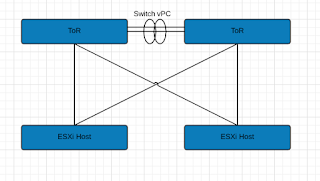
Summary: Here are the basics: Leaf/Spine Architecture (Basic illustration only show ToRs) Basic Illustration for explanation purposes vSphere 6.5U1 / vSAN 6.6 NSX 6.3.3 Multi-VTEP Deployment w/ LoadBalance-SRCID Standard VLAN for VTEP connections. 2x Nexus 9K ToRs Dell R630's Long story short, Switch vPC's were stripping VLAN ID info before sending to peer ToR then to ESXi host.  ESXi host dumped it causing these strange issues.  Load Balance SrcID w/ Multi-VTEP made this especially difficult to figure out because of the basic randomness.  Switch vPC link has a configuration advantage, so in order to keep it, we ran additional links between the switches to make some standard trunk connections.  Once done, we configured our NSX VTEP VLAN network to traverse those trunk connections rather than the vPC.  This resolved our stripping issue. See past page break for tools and more details on what we (mostly vmware NSX senior support staff) did to ...

vCenter UCS Alarm: IPMI SEL, SEL_FULLNESS

Image
Summary: This alarm means that server's CIMC system event log has filled up.  Below you will find the steps to clear this type alarm. PreReq: This assumes you are utilizing B-series UCS servers.  C-series may be slightly different in practice. Resolution: If you're vCenter is configured w/ default alarms, you'll likely see something like pictured below in vCenter under the hardware status tab: To clear this alert, you'll need to empty the SEL Logs in UCS of the blade related to your service profile.  You are not likely to find SEL Logs as part of the service profile. Once you've opened the related blade, select the SEL Logs tab.  Review and/or export the logs so you simply do not clear something that may need to be investigated.  Once done, you can safely clear the logs: Once the SEL Logs have cleared, the alert in vCenter should reset to green in a few minutes.

How to: tcpdump UCS Management traffic.

Rather than regurgitate all the information whole here is the skinny: SSH into your UCS chassis (aka primary fabric interconnect) connect nxos ethanalyzer local interface mgmt limit-captured-frames 2000 write volatile:/mycapture.cap ethanalyzer is the command local is default interface so we can tell it where we want to capture packets from. mgmt is the one I'm interested in limit-capture-frames is there because it limits to 10 by default and is way too fast when troubleshooting. write to output a capture file located in volatile memory (deletes when FI is rebooted.) Exit connect local-mgmt cp volatile:/mycapture.cap scp://username@linuxservername/somepath Where 'scp' is defined, can be ftp, sftp, tftp, volatile, or workspace as well. The capture file can be read in applications like wireshark . This helped me figure out my LDAP Authentication issues . Full article and explanation of how to do what I've outlined above was found here: http://...

UCS bug around Active Directory

Update: UCS 2.1  addresses this particular issue.  Bug ID:   CSCth96721 Summary: Found an interesting UCS bug on 2.0(3b) .  May be resolved in 2.0(4d) , but have not tested yet.  This particular problem only manifests itself if your Active Directory tree structure is elaborate and causes a user account's distinguishedName to be longer than 128 characters. Detailed: Essentially UCS queries Active Directory w/ samAccountFilter, it receives the results of the query.  It then makes a bind call against the DN using the results it received.  The problem is the DN bind call variable on the UCS side seems to be limited to 128 characters which it then truncates the information when it makes the bind call. Workaround: The only real workaround is to move the affected account to another a higher level OU to shorten it's distinguished name. Powershell: You can use powershell to determine the length of your distinguished name by utilizing the Quest Acti...

UCS SSH LDAP Login Syntax

Image
Summary: Login syntax using LDAP to Cisco Fabric Interconnects. Linux/Mac: Syntax: ssh ucs-authdomain\\username@UCSIPAddressORDNSName Example: ssh ucs-tech.zsoldier.com\\zsoldier@ucs.tech.zsoldier.com Windows/Putty: Syntax: ucs-authdomain\username Example: ucs-tech.zsoldier.com\zsoldier

UCS F0401 <-- Really annoying error

Image
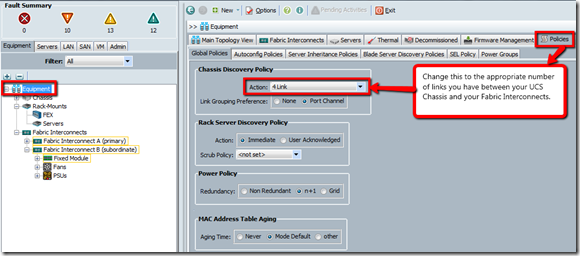
Summary: It had these ‘faults’ showing up on Chassis.  The error was rather vague, but one thing that hooked me was the idea that there was a ‘discovery policy’ incorrectly configured. Resolution: Find and change the discovery policy: Decommission the Chassis Recommission Chassis Voila, those errors should go away if you selected the correct discovery policy for your configuration.

ESXi Hosts Timing Out During HA Cluster Election

Image
[Guest Post by Jeremy Reiman ] Summary: ESXi hosts timing out during HA cluster election phase after cluster master is selected.  The HA Agent status in vCenter shows as unreachable on all hosts that timed out. Symptoms: ESXi host fails to enable HA Agent and shows error "operation timed out". Error message "[ClusterManagerImpl::IsBadIP] x.x.x.x is bad ip" showing in /var/log/fdm.log on ESXi hosts. TCPdump capture from ESXi host shows packets destined for IP address of other ESXi host are being sent to the MAC address of the firewall.  These should be going to the MAC address of the ESXi host management interface since both reside on the same VLAN. Configuration Info: ESXi host managment interfaces are on the same VLAN. ESXi 4.1 + Firewall is a Cisco ASA5500 running IOS 8.2(2) . Firewall Switch Module running 3.2(5) is also applicable. All network ports are open on the firewall between the vCenter server and the ESXi hosts. Resolution: Disa...

Cisco ASA, ESX/vSphere, and Duplicate IP’s

Summary: Windows (2003/2008/R2) and/or Linux VM’s added to a VLAN and continuously report duplicate IP’s and Windows assign themselves APIPA (Private Address). Symptoms: (Windows) 169.254.x.x Address shows up as (Preferred) when running ipconfig /all in command prompt Resetting Adapter pops up Duplicate IP Error. Changing VM Network to a dummy network and vm nic reset, causes issue to go away. Changing VM Network back to problem network clears issue until vm is reset or nic is reset. Resolution: Assuming the Cisco ASA is the cause, you can follow the below steps to rectify the issue: Login to the Security Appliance ASDM Select Device Setup Expand Routing Select Proxy ARP Disable Proxy arp on the related interface (usually associated w/ your VLAN) Other command line method: sysopt noproxyarp <interface name> If Windows is the issue for some reason, you can do this: Start –> Run… –> Regedit Find this key: HKEY_LOCAL_MACHINE\SYSTEM\CurrentControlSet\Serv...