Posts

VMware: vSAN Disk Group Cache Drive Dead or Error (VSAN Absent Disk)

Summary: A cache disk failed in my host taking along with it the disk group.  This is expected behavior, but for some reason, the disk group also disappeared from GUI so I couldn't decommission the disk group to basically replace the cached drive.  So, had to do it through powercli/esxcli.  Wish I took a screenshot, cause it was kind of annoying. PowerCLI Example: Once you've deleted the offending disk group, you can now create a new disk group utilizing the replaced cache disk and former capacity disks.
VMware: vxlan to vxlan traffic randomly fails or only works on the same ESXi host...

Image
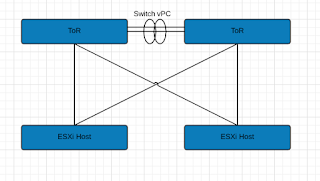
Summary: Here are the basics: Leaf/Spine Architecture (Basic illustration only show ToRs) Basic Illustration for explanation purposes vSphere 6.5U1 / vSAN 6.6 NSX 6.3.3 Multi-VTEP Deployment w/ LoadBalance-SRCID Standard VLAN for VTEP connections. 2x Nexus 9K ToRs Dell R630's Long story short, Switch vPC's were stripping VLAN ID info before sending to peer ToR then to ESXi host.  ESXi host dumped it causing these strange issues.  Load Balance SrcID w/ Multi-VTEP made this especially difficult to figure out because of the basic randomness.  Switch vPC link has a configuration advantage, so in order to keep it, we ran additional links between the switches to make some standard trunk connections.  Once done, we configured our NSX VTEP VLAN network to traverse those trunk connections rather than the vPC.  This resolved our stripping issue. See past page break for tools and more details on what we (mostly vmware NSX senior support staff) did to ...

VMware: Integrating OpenLDAP into SSO/PSC over LDAPS

Image
Summary: Quite simply was trying to get an OpenLDAP identity source added to SSO/PSC.  Would work fine using non-secure LDAP, but seemed to have issues when attempting to utilize secure LDAPS.  Simple error, nondescript basically describing that it failed. Heres what happened in my case: I had two server URL's defined for my target LDAP servers. OpenLDAP Config Screen Since I had the " Protect LDAP communications... " box checked, the next step requires me to either upload the target system's certs and their authoritative chains (think Root Certificate Authority (CA) and Intermediate CA's) If you can, uploading the needed certs would save some time, otherwise you can continue w/ my outlined steps below assuming the spyglass icon works in the same fashion for you. The cert upload screen has a little spyglass icon that'll pull it down for you, but in my case it would only pull the primary server's cert and associated CA certs.  It would not p...

Misc: Fire TV Stick 2 Screen Cut Off, no display adjustment option

Summary: Long story short, Fire TV Stick (2nd Generation) doesn't allow you to calibrate the screen, software wise, forcing you to use your TV settings (if available) to fit the screens content within it's borders.  Super annoying for some apps, but you can fix this dumb issue as I was able to. If your TV allows you to adjust its settings, then you'd be fine as well, but the Vizio I have, has no such setting. Solution: Get the Amazon Fire TV instead.  It's only slightly more expensive, but doesn't suffer the problems the Fire Stick does. Workaround: First you have to enable ADB debugging ( step 1 here ) on your fire stick. Next you'll need the ADB provided w/ Android Studio , or you can install w/ brew on the Mac . I prefer brew cause it's easier, keep following steps described by Amazon page if you are using Windows. Open Terminal brew cask install android-platform-tools Next find the IP address of your Firestick Settings --...

VMware: vSphere Scheduled Tasks w/ PowerCLI (not to be confused w/ Windows scheduled tasks)

Image
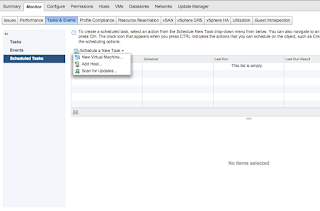
Summary: Question was posted in the communities on how to find scheduled tasks configured against a VM.  I remembered doing it long ago, but I never posted about it.  Also found it weirdly hard to find via Google, so I'm posting here for my own reference or anyone else needing it for that matter. Example:

VMware: Migrating Management(Mgmt) vmk to DVS/VDS fails when moving both vmnic and vmk at the same time.

Image
Summary: Quite simple, had a script to move physical nics to DVS/VDS w/ management vmk at the same time.  Typically this works w/o issue, but for some reason kept failing.  The answer was dead simple... Resolution/Workaround: Spanning Tree Enabled? Enable portfast on the switch ports. Or Spanning Tree not available? Move one physical link at a time (assuming more than one physical link available) Wait for uplink on DVS to come online, then move management/mgmt vmk Explanation: Basically, the switch ports that the ESXi servers were uplinked to did not have ' portfast ' (physical switchside config) enabled.  Without ' portfast ', when moving a physical nic from a standard vSwitch (or vice versa), there is a negotiation downtime the host incurs as the switch/host essentially renegotiates the connectivity.  It's a short window (5-10 sec) that the port goes 'offline', but it's enough for the migration of vmk and physical nics at the sam...

VMware: vSAN 6.6 not showing all available disks when attempting to claim...

Image
Summary: Was going through and attempting to setup new vSAN cluster but noticed that the wizard was only showing 3 of 4 disks from 3 of 4 hosts and 0 disks from another host.  This appears to be by design where the setup wizard will only target disks that have 0 partitions.  Makes sense. This, however, is not obvious in the setup. Solution: Simply delete any partitions from those disks that you'd like to have vSAN claim.  You can do this enmasse via PowerCLI or the Web Client interface (as pictured below). [ Warning: This is a destructive process so be sure that you know absolutely for certain that you are targeting the correct storage devices.  This is especially true if you plan to script this process.] Erase Partition in Web Client The above process would suck if you were doing it against a large cluster, so learn to do it in powershell or some other automated method. PowerCLI Method: $TCluster = Get-Cluster TargetClusterName $TVMHosts = $TCluste...