Posts

Showing posts with the label Docker

PowerCLICore: Docker: Case Sensitivity, script not running, errors.

Image
If you've been using powershell for any period of time, you'd get used to the idea that it doesn't really care about casing.   PowerCLICore on Docker ?  Yeah, it's a casing nazi...sometimes.  Now this experience was seen on a Mac.  Unsure if Docker running on linux sees this. When working w/ cmdlets in general, you should fine.  However, if you were to query for commands related to a specific module like pester: You'd get a blank return.  Looking at modules available via: get-module -listavailable Will show that pester is capitalized as "Pester" so valid get-command is: get-command -module Pester Long story short, if you are having issue running a script or whatnot, be sure to check your cAsInG. Interestingly, once you do a get-command -module Pester successfully, powerclicore on docker magically doesn't care about casing after the fact.
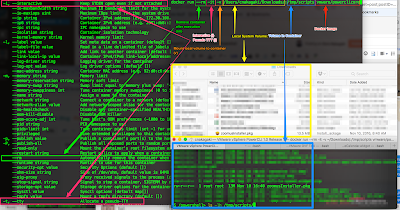
Powershell: Docker PowerCLI Core and Microsoft/Powershell - (docker -it switch)

Image
Assumptions: Docker running on MacOS.  (Likely runs the same on any other OS, minor differences) Summary: While I appreciate William Lam's posts on Docker and PowerCLICore ; I'm kind of dumb and need explanations on the simpler aspects of docker .  So for those who would like to know what the options in docker mean (to explore at least) and why it can looks strange even looking at 'help', here is how I understand it.  This can also be applied to Microsoft/Powershell container image as well. Details: docker run --rm -it -v /Users/cnakagaki/Downloads/:/tmp/scripts vmware/powerclicore The above line will pull the powerclicore container from docker hub  (if not already 'pulled'), run it in interactive mode (w/ pseudo TTY, needed), and mount my local Downloads directory to /tmp/scripts within the docker container. The part that mainly threw me off was the syntax combination of '-it' which essentially translates to -i (interactive) and -t (pseud...