Posts

Showing posts with the label iPhone

iPhone 文字バケ(MojiBake) gMail

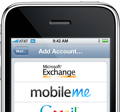
Summary: Sending and receiving emails from the iPhone mail app with Japanese characters are unreadable due to mojibake. Details: This seems to only occur if you use gMail's ActiveSync option by setting up your account on the iPhone by selecting Microsoft Exchange as the account type. Workaround: To remedy this, use either POP or IMAP when setting up your 'mail' account. You can still have your iPhone sync contacts and calendars seperately.

Send photos from the iPhone to a Japanese Cell Phone

Image
Summary: To successfully send e-mails w/ an attached photo from an iPhone to a Japanese cell phone, the photo needs to be resized to either 640x480 or 320x240. Photos taken with the iPhone's camera do not meet these size requirements. One app that I've discovered to help with that is called MailPhotos . It's fairly easy to use and has worked fairly well in my testing. Read below for detailed information. [Update: Does not apply to all Japanese cell phones apparently. Seems to depend on a combination of phone and/or carrier. My in-laws use AU, which this app works for, my friend in Tokyo uses Docomo and has a crazy phone that works fine with the default size. ] Details: One of my main complaints with using the iPhone was the inability to send photos via e-mail to my friend's cell phones. I couldn't figure out what the issue was for the longest time, until recently when testing. Seems any photo larger than 640x480 sent to a Japanese cell-phone doesn't seem...

iPhone Google App now includes Ninjas!

Image
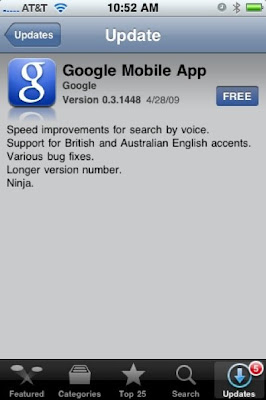
The iPhone Google App now includes Ninjas....freakin sweet! LOL

Netshare App by NullRiver

Image
Those lucky few who were able to swoop in and buy the NetShare app while it was online were lucky to get tethering capability w/ their mac. Sadly since the app was only released for a short while it seems that the app has it's downsides. Mainly being that I can only seem to get internet access using my iPhone through the Safari/Webkit browsers. The moment I try to use firefox or any other internet type of application, I get nowhere or it tries to save a file. Even setting up the proxy settings within the specific apps (where applicable) gets me no where. While $9.99 for free pseudo-tethering capability is pretty good, it just sucks that I can't use any other app besides Safari. Oh well, can't win them all I suppose.

iPhone 2.0+ (iPhone or iPhone 3G) Enterprise Configuration Tool

Image
In order to join your iPhone 2.0+ to your corporate secured wireless network that uses PEAP or other protocol, you have to use the iPhone Enterprise Configuration Tool. It's not possible to configure it from the phone itself apparently. Seems there are two ways to get the configuration profiles onto your iPhone: Via the web, by hosting the .mobileconfig file on a network accessible IIS or OSX Server. E-mail the config file to your phone. iPhone Enterprise Config Tool: http://www.apple.com/support/iphone/enterprise/ iPhone Enterprise Config Tool Deployment Guide: http://manuals.info.apple.com/en_US/Enterprise_Deployment_Guide.pdf