Posts

Showing posts with the label Mac

AI: Apple Music Auto Pause AI assisted app creation on call start

Image
Art by Prakash Kurup  - still my favorite whiteboard art by a guy that is dead to me... AI Generated App Link:   Mic Music Pause Summary: Have been messing w/ AI mostly for triage of stuff in my daily work.  Has been fantastic and exciting.  A side project I've had in the back of my mind for awhile has been how can I get an app that automatically pauses Apple Music when joining a teams call, then resuming once the call was over.  So I asked AI and it delivered fantastically.    Details: All I really did was prompt starting w/ copilot-cli and have a conversation to build this solution.  There are many things that I just don't do on a daily basis that AI helped me fill in gaps in memory and knowledge.  Here are the prompts I provided to copilot-cli get to a solution you can find on github .  The model I used was Claude Opus 4.8 .  Could I have used a different, cheaper model, probably.   My actual inputs (minus some things...

MacOS: Remove password requirement policies originally applied by MDM's

Image
Summary: Occasionally, a system no longer managed by an MDM will leave garbage behind.  One of those 'things' is password policies.  You can use a tool in terminal to get rid of the password policy.   Solution: sudo pwpolicy -clearaccountpolicies Note: * If you use above on a still managed system, the above solution will only be temporary.  I recommend following your MDM providers policies as they are in place to protect you and your company.  Regardless of how annoying they might be be. Reference: If you want to keep just some things related to the policy, you create your own using the referenced script below:

Misc: Workaround to silence Outlook for MacOS notification sounds while Do Not Disturb enabled.

Image
Summary: Work from home doesn't mean you should be on 24/7, which is why MacOS's "Do Not Disturb" function is great.  What's not great is that not all apps on MacOS respect it.  Microsoft Outlook for MacOS is one of them.  I've put in a bug/feature request for it to natively respect MacOS do not disturb.  In the meantime, you can make use of MacOS Automator silence your system based on a calendar trigger. It's no fun having anything that isn't muted going off in the middle of the night.  Below can be used to basically mute your system.  You can also have Automator close Outlook, but I've found that muting the system instead will catch any other application offenders that do not respect MacOS's do not disturb function.  Not to mention the dreaded, "Would you like to save this?" message that prevents the app from closing. Workaround: Launch MacOS Automator, you can find it in your Applications Folder. Create your Automator task type by ...

MacOS: Names not showing up in Messages/iMessages.

Image
Summary: I'm usually texting via my Mac most of the time.  So when I receive a text from a known number and it's not translated/associated to a name, it raises questions for me.  Why?  Long story short, one of my accounts (gmail) in this case where most of my contacts are stored wasn't syncing properly.  Don't know why, but here is what you can look for to resolve the issue. Things to Check: Launch the Contacts App Preferences > Accounts Make sure all accounts are enabled In my case, one gmail account showed enabled, but this "fetch" dropdown was missing.  I had to re-enable this particular account in systems preferences for it to 'wake-up'.  See Step 2. Launch System Preferences Select Internet Accounts Make certain all accounts have "Contacts" selected If they are, as they were in my case, toggle the checkbox off, then back on. After fixing this, everything started syncing properly.  Unsure what cause...

MacOS: AnyConnect VPN client was unable to successfully verify the IP forwarding table modifications.

Image
The VPN client was unable to successfully verify the IP forwarding table modification.  A VPN connection will not be established. Summary: I started running into issue utilizing Cisco AnyConnect on my Mac basically complaining about not able to overwrite IP forwarding tables.  This was on 4.6.x.  Since my VPN endpoints were not providing me w/ an updated client and w/ no access to Cisco Anyconnect downloads, my only option was to try openconnect.  It was totally worth it, here is why and how to set it up. PreReqs: Homebrew Installing OpenConnect: Launch MacOS Terminal brew install openconnect Getting VPN IP's/DNS Endpoints from AnyConnect: The information is typically located in your profile xml files located here: /opt/cisco/anyconnect/profile/somethingsomething.xml In the xml file, you are looking for "<HostAddress>typicallyaDNSName.com</HostAddress>" entry.  These are your VPN endpoints that you would need to pass to openconnec...

MacOS: zsh Terminal and other misc restore/configuration portability...

Image
Summary: I bought a new macbook pro and typical behavior is to use time machine to restore.  This method is perfectly acceptable 99% of the time.  Those that mess w/ kext, sudoers, and other jazz... not so much.  I originally did a time machine restore, but that brought over a mess of things that I quite frankly had forgotten about (I like to tinker) and that was unfair to my new macbook.  Needless to say, but I bricked my new macbook which led me to  Konmari my setup. Details: Then there is the portability aspect of my terminal environment that I've been so lacking.  In combination w/ Dropbox, I'm able to move this stuff around and keep things in sync much easier now. Basically restoring bash/zsh alias is a pain.  Modifying any of these things is also a hassle.  So I developed a shell script that will basically take files that exist in my Dropbox directory and symlink the original files back to Dropbox. This way I can simply run th...

Bash, Applescript, and Sshuttle (Python): Creating a multi-jump into the multiverse...

Image
via GIPHY Summary: Basically, I work through VPN's most of my existence.  The problem lies when I have to switch to different VPN's it disrupts my communications w/ other tools that only exist in one VPN, but not the other.  There does appear to be tools around some of these things, but I wanted something quick and dirty.  AND DIRTY it is.  This enables me to stay connected to the main VPN and cheat by sshuttle'ing through systems of access temporarily. Details: I'm using MACOS and to launch a terminal in a new window turned me on to AppleScript.  I wanted to pass two variables. 1st was basically an identifier for the end system I wanted to shuttle my traffic through. 2nd was to pass a password variable to any system inbetween that was not setup w/ my SSH public key. So I made a bash function, to call applescript to open my terminals to run what is effectively a python binary.  It works, but has several prerequisites for it to run smoothly....

Microsoft Word for Mac: Bullets not formatting properly.

Image
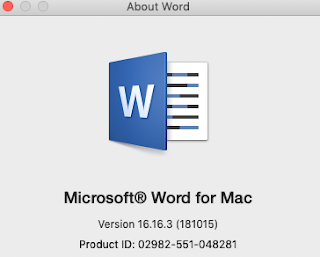
Summary: Hard to quite describe, but I was working with an existing word doc and modifying some bulleted lists.  Needless to say, I was having some trouble w/ my normal methods of simply deleting a bullet and if it moved text to bullet above, hit enter to move it down. This was not working.  Among other things it would reformat it in ways that just weren't working.  Found it that it had to do w/ "Track Changes" being enabled AND what seems to be 'too many' changes before they were accepted. Workarounds: Accept all changes or Turn off "Track Changes" Either one works, but I still wanted to track changes, so I left it on and simply accepted all changes.  After doing so, working with bulleted lists worked fine.  Seems like a bug that needs to be addressed.  I have been running Office Insider Fast Track, so that MAY be part of the problem, but leaving this here for reference. MS Word for Mac version 16.16.3

Mac: Quick Screen Recording on MacOS (Bonus TouchBar Integration)

Image
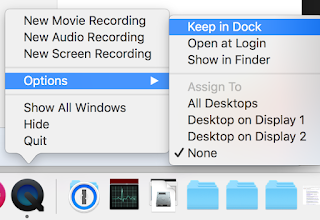
Summary: To launch screen recording w/ Quicktime Player feels really unintuitive.  I'm betting the average person has no idea this capability exists.  I often forget it's able to as well.  Reason being, when you launch Quicktime Player, it defaults to opening a 'finder' window for you to select a file to 'play'.  So here is a way to kind of "shortcut" access to Quicktime screen recording on MacOS. Solution: Launch QuickTime Player "Right" Click on QuickTime Player Dock and Select "Keep in Dock" Now with QuickTime Player in dock, you can "Right Click" the icon and select Screen Recording. Bonus: Macbook Pros with Touchbar will have a smart menu to select capture type.  You can select either full screen recording of each individually attached screen or "selection" which allows you to simply click and drag your mouse on any portion of the screen.

VMware: PowerNSX on Mac Invoke-nsxwebrequest unknown exception

Image
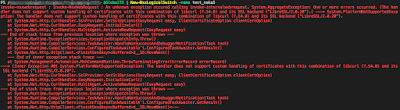
Blarg! Summary: All was well and dandy until I tried to actually "do" something.  I was trying to create a new logical switch (New-NSXLogicalSwitch) when these errors reared their ugly head: https://github.com/vmware/powernsx/issues/493 One or more errors occurred. (The handler does not support custom handling of certificates with this combination of libcurl (7.54.0) and its SSL backend ("LibreSSL/2.0.20").) ---> System.PlatformNotSupportedException: The handler does not support custom handling of certificates with this combination of libcurl (7.54.0) and its SSL backend ("LibreSSL/2.0.20"). Workaround: Windows w/ full Powershell does not have these issues.  Have yet to see if it is a thing specific to Powershell Core.  So use it if you can. If you don't have a Windows box handy, you can modify the PowerNSX.psm module file to get around this error.  I'm unsure if it can become a permanent solution, but it effectively accomplishes the...

Python: Using VS Code on Mac pylint errors

Image
Summary: Having python built in on Mac can cause issues when you try to work python code.  One such issue is that VS Code will consistently complain about pylint missing and will attempt to install.  It'll likely fail every time and also show a nice little warning suggesting to upgrade pip to the latest version.  Slight annoyances, but annoying nonetheless. If you've installed Python 3 using brew based on my last post, then this'll be a helpful continuation. Python: Modules installed with PIP3 on Mac not getting installed? Resolution: It's quite simple. Launch Visual Studio Code Code --> Preferences --> Settings In the right pane User Settings, simply add your preferred python path. "python.pythonPath": "/usr/local/bin/python3" brew places a pointer here for you if you followed my last post. Save You can also set your preferred interpreter on-demand rather than statically setting it in your user settings.  See referen...

Python: Modules installed with PIP3 on Mac not getting installed?

Image
Summary: I was essentially just trying to import a module for my python3 installation, but found it was not installed.  Typically, you should be able to install it via PIP (PIP3 in Mac case so it would install to 3.x version instead of built-in 2.x version).  It appears to install fine, but it would not appear in my installed modules when calling help("modules").  Then I noticed the problem... Details So in my case, I had python 2.7 and python 3.5 installed via the standard packages provided by python.org.  Nothing wrong with this and very typical, but my tinkering screwed me because I also use brew package installer.  This likely got my pip3 installation messed up and out of sync w/ standard packages installed.  My pip3 pointer was going to a 3.6 version whereas my python3 pointers were going to 3.5.  So, if not obvious, calling pip3 to install modules would only be good for python 3.6. ls -lh /usr/local/bin pip3 --version Now my unde...

Mac: VPN over SSH using sshuttle

Image
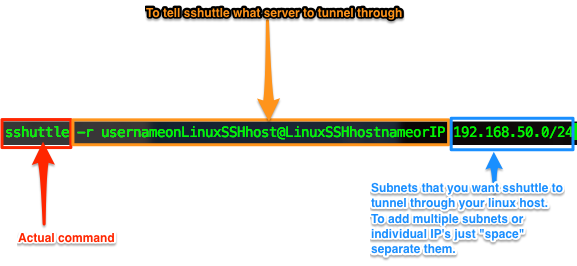
Summary: Sometimes it's simply easier to run or do things from your local system rather than rely on a bastion/jumphost.  sshuttle allows you to utilize a Linux bastion/jumphost as a psuedo VPN endpoint. Full documentation and source can be found here: http://sshuttle.readthedocs.io/en/stable/manpage.html https://github.com/apenwarr/sshuttle Walkthrough: Brew is probably the easiest installation method and less prone to complications by using pip.  So that's what I'll go through here: Launch Terminal brew install sshuttle sshuttle -r usernameonLinuxSSHhost@LinuxSSHhostnameorIP 192.168.50.0/24 Done.  Easy right?  Now upon successful connection, all traffic bound for an ip on 192.168.50.0/24 will tunnel through your Linux SSH host.   Additional Notes: Remember to kill your session when done.  I've heard of reports that sshuttle having memory leaks or whatnot causing RAM to fill up.  Killing terminal session should kill it, bu...

Powershell: PS Core on Mac updating on launch and setting an alias for brew cask based installs...

Image
Summary: You can now install powershell core via homebrew on a Mac.  One thing I noticed is that it doesn't, which the pkg installers do, set an alias to launch powershell in the terminal.  Instead it installs an "app" in your applications directory to launch powershell.  Two things I wanted to accomplish: Set an alias to launch powershell in terminal Update powershell on launch. Solution: Easiest way to go about this is simply to insert some alias into my .bash_profile.  Like so: Launch Terminal nano ~/.bash_profile or vi if that suits your fancy. alias powershellupdate="brew update; brew cask reinstall powershell; pwsh" alias powershell="pwsh" Exit [Ctrl+X] and Y to save. source .bash_profile This is to refresh your current bash session w/ your newly edited profile. Once done, I can now type either "powershellupdate" or "powershell" in terminal.  I did this approach for simplicity so I can quickly...

Chrome: On MacOS downloads .OVA files as OVF's.

Image
Summary: I must not download OVA's all that often.  When I do though, Chrome decides that "nah" you should name that into OVF.  Seems to be a long standing bug w/ Chrome and MacOS.  Not really a huge problem until a you try to import the OVA w/ the file extension of OVF. Error when trying to import: Basically the error returned when trying to import an OVA w/ OVF file extension: "Failed to open OVF descriptor" Workaround 1: Stop using Chrome...Haha, just kidding. On macOS, you simply have to enable "Show all filename extensions" in Finder.    You'll usually find this icon in your dock.  Probably the most under-stated/used icon in your dock. Once done, Chrome will download OVA's as is and not change it to OVF like a proper browser.  Honestly, if Chrome does it for OVA's it "might" do it for other file extensions as well.   Firefox and Safari don't have this problem , so if you use either of those, Bravo! ...

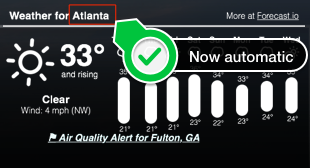
GeekTool: Geekweather2 auto-geolocation updated w/ city name

Image
Continued from:   http://tech.zsoldier.com/2014/11/geektool-geekweather2-w-auto-geo.html I briefly looked through the corelocation framework .  Looks like the CLGeocoder Class could return friendly names, but I've been playing w/ Python lately so took that route for now. Be that as it may, wrote a little python script to take the latitude and longitude results from locateme to have it return city name from Google mapping API's.  I also updated the geekweather2.sh script to accept "Names" that have underscores and/or spaces.  The python script needs work as I'm kind of guessing w/ the return I get from geopy . I'll look into it more just out of curiosity, but if you have a chance, would love for someone to update my gist to determine city more accurately. PreReqs: Install geopy module for python pip install geopy Below is my fork of geekweather2.sh: https://github.com/Zsoldier/GeekWeather2/blob/master/geekWeather2.sh Below is what th...

Did you know? Running ESXi on Macs has licensing caveats...

Image
Did you know that according to Apple's OS X EULA, you are only allowed to run 2 OS X VM instances per physical device? So what does that mean for running ESXi on a Mac Pro?  You can only run, legally , 2 OS X VM's on it. http://images.apple.com/legal/sla/docs/OSX1010.pdf How's them apples?  Kinda sucks, wondering what other people have done to get around this?  Mac Mini value was much better w/ vSAN when it had two internal disks (for the server version). Really the only option is to talk to your Apple rep and see how you can license more.

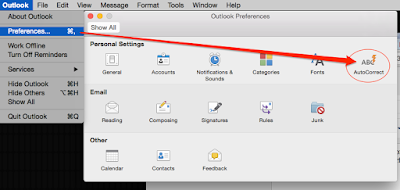
Outlook for Mac _underscores_ turn to italics?

Image
I finally took the time to find and turn off this incredibly annoying 'feature' in Outlook.  Figured I'd post for anyone else loving this wonderful feature.  Honestly, 'most' people will probably not have this problem, but when working in the IT world, everything has an underscore. Outlook Preferences-->  AutoCorrect -->  AutoFormat Uncheck *Bold* and _italic_ with real formatting

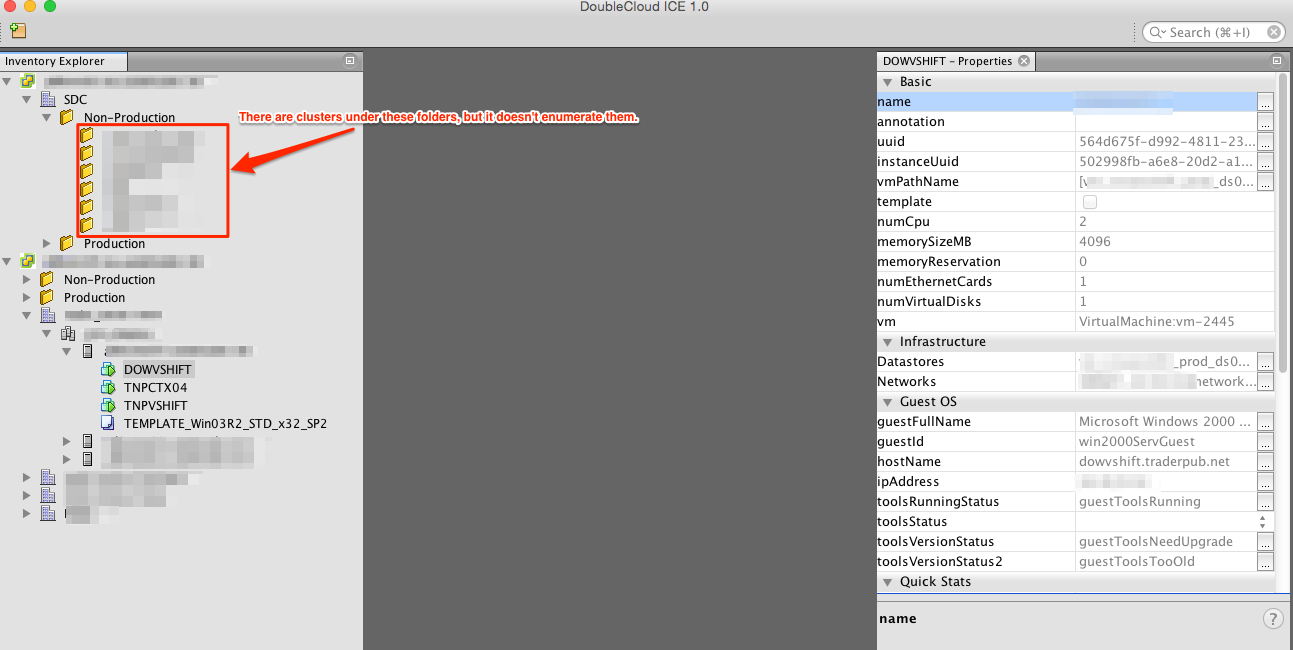
vCenter Client for Mac/Linux!? No, not completely, but a most useful tool.

Image
I was lucky enough to play w/ some early builds that Steve put together and now it's finally a 1.0 product.  I highly recommend downloading and playing with it in the very least.  It is a free download. The one bug that I remember reporting, that doesn't appear to have been fixed yet though is that the client doesn't understand folders in the hosts & clusters view.  So if you have clusters/hosts in folders, it will not enumerate those in the client.  So it's rather useless to me currently, but should work fine for most people. You can read more about it here: http://www.doublecloud.net/product/ice.php http://www.doublecloud.org/2015/03/doublecloud-ice-the-ide-for-managing-clouds/ Download here: http://www.doublecloud.net/downloads.php

Error: Issues information is not available at this time. (vCenter Appliance)

The above was a wonderfully descriptive error I would receive in the web client.  This started appearing after I removed individual nodes from a cluster and readded them back to inventory.  (was trying to clear some bunk HA errors) Long story short, I had to open the C# client to find out what 'warning/error' it was complaining about.  Quite simply, I had forgotten to re-add the hosts back into the vDS and migrate the vMotion/ vSAN vmk connections. Man-o-man, I see why so many people complain about the web client. The upside to the story was I found out a couple of things about vSAN . Having a 3-node cluster minimum, I was able to remove and re-add each host back into the cluster with no issues to VM's running on each host. Even w/ the vDS problem, vSAN kept chugging along w/ VM's running just fine. In other words, even without vCenter managing things, the ESXi hosts kept everything running just fine. This was on my mac mini vSAN cluster .