Posts

Showing posts with the label Bash

NSX-T: Deleting route advertisement filters via API

Image
  Summary: When creating a DHCP server in NSX-T, a route advertisement filter is automatically created for you.  This is so that the DHCP server is prevented from advertising DHCP addresses outside of your fabric.  This is fine for the most part, but there are occasions where the DHCP subnet you allocated may overlap a DNS forwarder IP that you may have setup before. Honestly, this feels like a logic bug to where it shouldn't allow this, but oh well.   Detailed Steps Anyway, all you have to do is delete the DHCP server in question, but in some cases, the route filter may not be deleted along with it. In that case, you can delete the route filter itself via the Manager UI: Select Manager > Networking > Tier-1 Logical Routers > T1 in question > Routing > Route Advertisement > Select DHCPServerRouteFilter > Delete. In the case where the delete option is greyed out, you can use the below curl code to clear it out.  This is the last ditch ef...

NSX-T: Create CSR's with SAN entries, self sign, and apply them

Image
Summary: This utilizes an experimental API endpoint in NSX-T, but I've found it to work without issues.  Be warned though, the endpoint may not function the same in newer releases.  This has worked in 3.1.2. Details: The variables at the beginning of this shell script must be defined for your environment. Your DNS names should resolve to your appliances. This does work w/ 3.1.2, but may not in future revisions. Example Code:

NSX-T: Get BGP Route Table from T0 via Powershell/Curl

Image
Summary: Azure VMware Solution doesn't currently allow CLI/SSH access to your Edge VMs.  So typical CLI way to find information is not possible.  If you need to get things like a route table from your T0, you need to do it through API methods since the UI still doesn't provide this.   [Update: I lied, you can download route table via UI.  But imagine how much cooler you would be using powershell. ;)] UI Method: Powershell Method: Curl Method:

MacOS: zsh Terminal and other misc restore/configuration portability...

Image
Summary: I bought a new macbook pro and typical behavior is to use time machine to restore.  This method is perfectly acceptable 99% of the time.  Those that mess w/ kext, sudoers, and other jazz... not so much.  I originally did a time machine restore, but that brought over a mess of things that I quite frankly had forgotten about (I like to tinker) and that was unfair to my new macbook.  Needless to say, but I bricked my new macbook which led me to  Konmari my setup. Details: Then there is the portability aspect of my terminal environment that I've been so lacking.  In combination w/ Dropbox, I'm able to move this stuff around and keep things in sync much easier now. Basically restoring bash/zsh alias is a pain.  Modifying any of these things is also a hassle.  So I developed a shell script that will basically take files that exist in my Dropbox directory and symlink the original files back to Dropbox. This way I can simply run th...

Misc: Adding/Enabling a Linux user via ssh public key w/ sudo and to not require a password.

Summary: This is a very specific use case, but is helpful when working w/ cloud instance VM's that don't make use of central auth.  The following script essentially adds a user to Linux so that they can ssh into the system w/ using their ssh public key and utilize sudo if granted.  Running sudo as these users typically requires a password be set.  In this case, we are not setting a password on the account as  This script circumvents the need for users to provide a password. Details: Effectively, the script works like so: An existing sudoer/root/admin must run this script. You provide a username and the user's ssh public key. Set sudoer to true or false (or anything other than true really) customsudofile path defaults to /etc/sudoers.d/nopasswd Essentially, anything in sudoers.d path is ingested by sudoer file as an override. customsudodata is what you want to insert into the custom sudo file. Default set to allow sudo members to invoke sudo w/o a...

Bash, Applescript, and Sshuttle (Python): Creating a multi-jump into the multiverse...

Image
via GIPHY Summary: Basically, I work through VPN's most of my existence.  The problem lies when I have to switch to different VPN's it disrupts my communications w/ other tools that only exist in one VPN, but not the other.  There does appear to be tools around some of these things, but I wanted something quick and dirty.  AND DIRTY it is.  This enables me to stay connected to the main VPN and cheat by sshuttle'ing through systems of access temporarily. Details: I'm using MACOS and to launch a terminal in a new window turned me on to AppleScript.  I wanted to pass two variables. 1st was basically an identifier for the end system I wanted to shuttle my traffic through. 2nd was to pass a password variable to any system inbetween that was not setup w/ my SSH public key. So I made a bash function, to call applescript to open my terminals to run what is effectively a python binary.  It works, but has several prerequisites for it to run smoothly....

GeekTool: Geekweather2 auto-geolocation updated w/ city name

Image
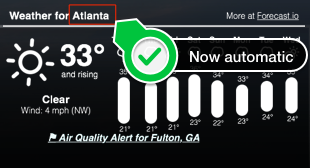
Continued from:   http://tech.zsoldier.com/2014/11/geektool-geekweather2-w-auto-geo.html I briefly looked through the corelocation framework .  Looks like the CLGeocoder Class could return friendly names, but I've been playing w/ Python lately so took that route for now. Be that as it may, wrote a little python script to take the latitude and longitude results from locateme to have it return city name from Google mapping API's.  I also updated the geekweather2.sh script to accept "Names" that have underscores and/or spaces.  The python script needs work as I'm kind of guessing w/ the return I get from geopy . I'll look into it more just out of curiosity, but if you have a chance, would love for someone to update my gist to determine city more accurately. PreReqs: Install geopy module for python pip install geopy Below is my fork of geekweather2.sh: https://github.com/Zsoldier/GeekWeather2/blob/master/geekWeather2.sh Below is what th...

vSphere: no coredump target has been configured (fix it w/ powershell)

Image
Was able to fix the above error by following steps outlined here: http://blog.ukotic.net/2015/05/31/no-vmkcore-disk-partition-is-available/ So that inspired me to write how you can do this against multiple hosts via a scripted method.  I started by simply exporting a list of servers via PowerCLI: Get-Cluster myCluster | get-vmhost | select name | out-file -FilePath D:\scripts\Output\clusterlist.txt -Encoding ascii I opened the txt file, removed the 'name' header, then ran the following: for server in $(cat ~/Desktop/clusterlist.txt); do ssh -o UserKnownHostsFile=/dev/null -o StrictHostKeyChecking=no root@$server 'esxcli system coredump partition set -u; esxcli system coredump partition set --enable true --smart' done A better way to do this would be to use plink, above was a quick and dirty way for me.  So here is a way to do it all from Powershell only that quite frankly would've saved me the trouble of pasting the password in 20 times: $Creds =...

GeekTool: GeekWeather2 w/ auto geo-location...

Image
If you haven't downloaded geektool for the Mac, I would definitely recommend doing so for the 'tinkerers' out there.  I first saw it on LifeHacker and have been somewhat infatuated with it.  Here is what one of my mac's looks like: Click the image to see it full resolution. Since the bash command line outputs can be downloaded as geeklets  and are relatively easy, I'm going to focus on how to setup the GeekWeather2 geeklet.  In addition to setting that up, I'll also show you how I was able to get it to update the image based on my current location rather than statically set Longitude, Latitude parameters.  (Geeklet is simply another term for a widget specific to geektool.)  Continue through to the page break to learn more.