Posts

Showing posts with the label SOAP

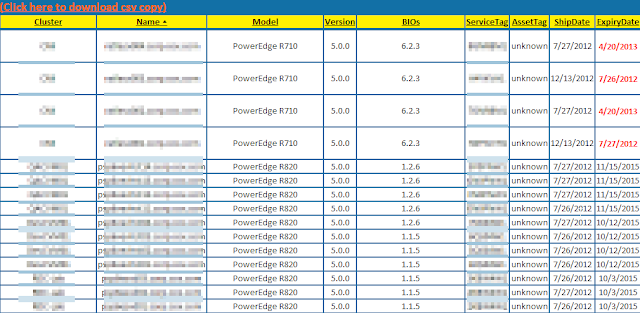
Get Dell ESX host warranty info via PowerCLI version 3
Image
Summary: Had a script that was doing a screen scrape of Dell's support page for warranty info.  Now they require a log in.  So it was time to finally revise my script to use Dell's wsdl (SOAP) interface. Example: Details: I was able to simplify the script a bit using the code provided by Jon Gurgul to pull from Dell's provided SOAP service.  I copied the code into a Get-DellAssetInformation.psm1 file so I could call the function as a module. The variable you should probably update is the $ServiceDescription variable to match the warranty type you expect from your boxes so you get an actual return of data. I simply plugged this into my existing code removing the screen scrape code and this is what I ended up with: Script: Add-PSsnapin VMware.VimAutomation.Core #Module code courtesy of Jon Gurgul Import-Module C:\myModuleDirectory\Get-DellAssetInformation.psm1 $VIServer = Connect-VIServer myvCenterServer $date = Get-Date $htmpath ...

SOAP(y) Powershell fun w/ BT Diamond's IPAM (Part 1)

PreReq: API Access Powershell 2.0 + I'm using 3.0 now.  I assume these examples work in 2.0 as well, but I'm too lazy to test. This was a bit of an interesting exercise for me since I've mostly only ever used cmdlets.  I'm still using cmdlets, but calling SOAP based web services to gather information. Here is what I've been experimenting with: #Credentials are needed when working w/ a secure web service. $Creds = Get-Credential #I was able to find the correct API address by clicking the help link on the login page.  They seem to have a different web service per API instruction type.  In this case, I just want to 'get' address information thusly demonstrated below. $IPControlGetService = New-WebServiceProxy "https://myIPControlServerNameorIP/inc-ws/services/Gets?wsdl" -Credential $creds #This is where it gets interesting, from here I can essentially browse what properties and methods are available to me by calling the $IPC...