Posts

Showing posts with the label vCenter

Powershell: Get SHA256 Thumbprint from vCenter server using Powershell Core. (NSX-T Compute Manager Registration related)

Summary: Had a need to pull a target vCenter's SSL certificate and convert it's thumbprint to SHA256 format to register to NSX-T Manager using Powershell core.  Servicepoint was not available in Core. Noticed also recently Lam updated his approach to take Core into account.  My approach is slightly different and my script will also return the certificate object back if you so choose rather than just the SHA256 value.  Anyway, I've tested in PS Core 6.0.4 and 6.1 on Ubuntu, CentOS, and MacOS and my function seems to work fine.  Let me know if you see otherwise. GIST below:

vSAN: Configure an all-flash vSAN using PowerCLI

Script that I'm putting together to configure new all-flash vSAN clusters.  Still a work in progress, I plan on making it into a function once I've worked out the kinks.  Hosting it on gist.github.com so feel free to make suggestions.

vSphere: Big Data Extensions (Also how to increase heap size in vSphere 6)

Image
Summary: Installing BDE from VMware is pretty easy, but there are some requirements that you need to meet prior to deployment. Forward and Reverse DNS lookup records for you BDE appliance. Make sure your ESXi hosts, and vCenters are NTP synced. Anyway, regarding the above error: Certificate does not have a valid chain and is invalid. Assuming both preReqs and any others listed in BDE documentation are met, the only way I've been able to work around this problem is by increasing the vSphere Web Client's max heap size from 2GB to 4GB. This took some work detective work from my TAM, but he found me a way to increase specific services heap size in 6.0.  Here is the line you will need to increase the web client's heap to a size appropriate for your environment that the dynamic sizing may not understand. This is for the vCenter Appliance, but same applies for Windows server. cloudvm-ram-size -C 4096 vsphere-client service vsphere-client restart Here i...

PSA: DO NOT UPGRADE from 5.0/5.1 straight to 5.5 U3b

Image
Really VMware!? Here is the KB:  https://kb.vmware.com/kb/2143943 [UPDATE: Patch released that should fix this issue: https://kb.vmware.com/selfservice/microsites/search.do?language=en_US&cmd=displayKC&externalId=2144357 ] Basically, you'll end up w/ some 5.0 hosts that will be overloaded w/ VM's, assuming you used UM to do your updates.  In my case, I had 13 hosts on 5.5 w/ 2 hosts overloaded on 5.0. So here is my workaround to keep VM's up and running w/o rebooting them: Fresh Install ESXi 5.5 U2 on some hosts that were already upgraded to 5.5 U3b In my case, most of my 5.5U3b hosts were empty. Once 5.5 U2 is installed, you should be able to successfully migrate from 5.0 to 5.5U2. Follow that up by migrating from 5.5U2 to your remaining 5.5 U3b hosts. This worked for me and saved my arse.  Hope you don't run into this and I'm sorry for all those previous to me that actually followed that stupid KB. On the flip side, a PERFECT case as...

NetApp VSC 4.2.2 HTTP Error 500 VSphereAuthenticationFilter only support jetty requests

Image
NetApp KB  ID  2026327  only states error 503, but the fix listed in the article will also fix this error 500 problem too. It seems to only affect vCenters running 5.5 U3b or higher.  Anyway, probably far and few between dealing w/ this, but hopefully this helps someone looking for a solution.  Long story short, the KB details certain conf files that need to be modified. Perform the following steps to resolve the issue: Open  %Programfiles%\Netapp\Virtual Storage Console\smvi\server\etc\wrapper.conf Locate the  wrapper.java.additional.X  lines (should be 4) Add the following line: wrapper.java.additional.5=-Dhttps.protocols=TLSv1,TLSv1.1,TLSv1.2 Open  %Programfiles%\Netapp\Virtual Storage Console\wrapper\wrapper.conf Locate the  wrapper.java.additional.X  lines (should be 7) Add the following additional line: wrapper.java.additional.8=-Dhttps.protocols=TLSv1,TLSv1.1,TLSv1.2 Restart both VSC services, or reboot.

vSphere: SFCB configuration has changed

Image
Was getting this error when applying a host profile.  It happened after I changed the DVS/vDS 'NAME'.  I updated it in the host profile too.  It's a nondescript error that I couldn't figure a way around.  So what did I do?  Deleted the profile and created a new host profile based on a host I knew was configured correctly.  Voila, SFCB configuration has changed error/noncompliant host profile state GONE! Resolve by simply deleting and recreating host profile.

VMware: Error 26002/26006 - Upgrading vCenter from 5.0 to 5.5 w/ CA signed certs

Image
There are troves of these articles online about this so I'll try to keep this concise. Steps for moving from one VM (assuming Windows and SSO/PSC already in place) to another: Shut down and disable services on original VM. Rename original VM. Rename new VM to original VM's name. Create the following directories on new VM: C:\ProgramData\VMware\Infrastructure\Inventory Service\SSL ProgramData is typically always on C: drive, so this is a must. C:\ProgramData\VMware\VMware VirtualCenter\SSL ProgramData is typically always on C: drive, so this is a must. C:\Program Files\VMware\Infrastructure\Inventory Service\SSL C: drive can be replaced w/ drive that you plan to install inventory services. Copy your signed certs from your old VM to this new one in the above directories. rui.pfx rui.crt rui.key In the case of the VirtualCenter SSL directory, you'll probably also need the following, I think they are used for the custom spec passwords: sms.trustst...

vSphere Web Client (vCSA) stuck on authenticating

Image
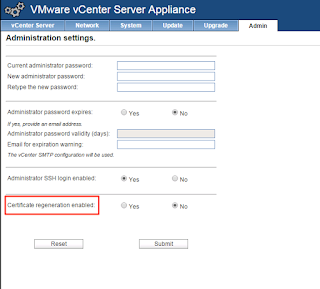
Related to vSphere 5.5 and vCenter Server Appliance. Basically, when attempting to log into the web client I would get the following error message or the dreaded authenticating forever loading bar: Could not connect to vsphere web client contact your administrator to fix this issue Long story short, I did the following to fix my problem: Switched to embedded SSO and back to external SSO. Honestly, this step may or may not have been needed, but I did notice errors in my SSO server logs.  You might try step 2 first just to see. Under the admin tab select Yes for certificate regeneration and hit submit. Then switched back to no. Restarted Web Client Service. Details: Thankfully, I had another vCenter appliance attached to the same SSO server that was working fine.  So to troubleshoot, I looked at the virgo logs for the web client on the one that was working and that one that was not.  I noticed that my working vCenter Web Client would get a respon...

VCSServiceManager not uninstalling

Image
Summary: So here is the scenario.  I'm uninstalling vCenter, but leaving SSO because I am testing something.  I go to upgrade SSO 5.5 to 6.0, I get an error of "Cannot start vCenter Service" or something close to that effect.  Uh ok, why?  vCenter Service isn't even there,  Turns out, my uninstallation of vCenter did not uninstall VCSServiceManager service properly and it now is stuck there. Workaround: Visit this page from the affected system Make sure to add http://*.microsoft.com and https://*.microsoft.com to your trusted sites list in IE. If you don't, well, you'll likely end up in IE hell. Run FixIT and run through the wizard to have it remove the VCSServiceManager install. Details: The vCenter installation for 6.0, I guess, detects this VCSServiceManager and bombs on the upgrade even if it is just SSO.  So I'd run the uninstall manually and the entry wouldn't go away.  No interactive error, nothing.  Looking at event ...

NetApp VSC Performance

This is related to the 4.2.2 version.  Essentially, the JVM that is installed for the NetApp VSC, defaults to the following: Initial Heap Size : 64MB Max Heap Size: 1024MB What does this mean?  It means that if you deploy a VM w/ 8GB of RAM to install VSC on, it will only EVER use 1GB of RAM.  The VSC (4.2.2) also tends to have performance issues when dealing w/ larger environments.  There is an article somewhere, but I can't find it for the life of me right now.  Anyway to fix this issue, you need to modify the wrapper.conf file. This is typically in the installation directory of C:\Program Files\NetApp\Virtual Storage Console\wrapper\wrapper.conf The lines you need to modify are: # Initial Java Heap Size (in MB) wrapper.java.initmemory=1024 # Maximum Java Heap Size (in MB) wrapper.java.maxmemory=4096 Now you 'can' up the heap to 4GB max if you think it needs it, but I'd recommend looking @ "Active Memory" stats of the VM t...

vCenter Client for Mac/Linux!? No, not completely, but a most useful tool.

Image
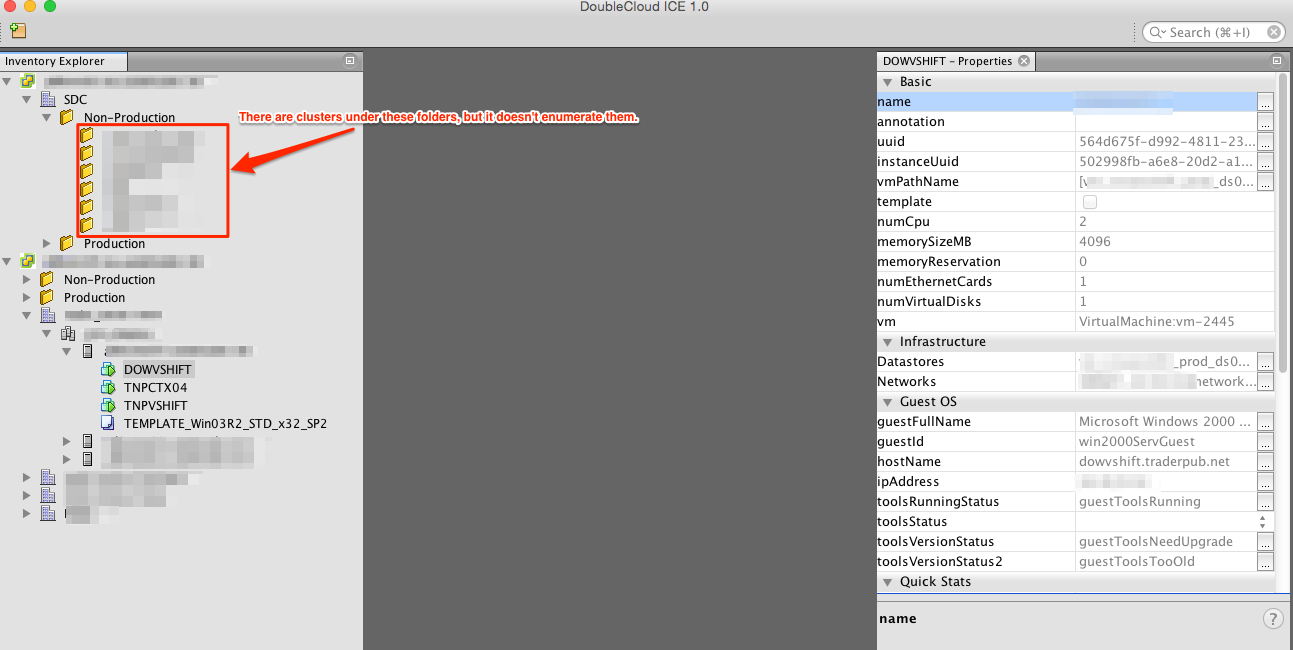
I was lucky enough to play w/ some early builds that Steve put together and now it's finally a 1.0 product.  I highly recommend downloading and playing with it in the very least.  It is a free download. The one bug that I remember reporting, that doesn't appear to have been fixed yet though is that the client doesn't understand folders in the hosts & clusters view.  So if you have clusters/hosts in folders, it will not enumerate those in the client.  So it's rather useless to me currently, but should work fine for most people. You can read more about it here: http://www.doublecloud.net/product/ice.php http://www.doublecloud.org/2015/03/doublecloud-ice-the-ide-for-managing-clouds/ Download here: http://www.doublecloud.net/downloads.php

Error: Issues information is not available at this time. (vCenter Appliance)

The above was a wonderfully descriptive error I would receive in the web client.  This started appearing after I removed individual nodes from a cluster and readded them back to inventory.  (was trying to clear some bunk HA errors) Long story short, I had to open the C# client to find out what 'warning/error' it was complaining about.  Quite simply, I had forgotten to re-add the hosts back into the vDS and migrate the vMotion/ vSAN vmk connections. Man-o-man, I see why so many people complain about the web client. The upside to the story was I found out a couple of things about vSAN . Having a 3-node cluster minimum, I was able to remove and re-add each host back into the cluster with no issues to VM's running on each host. Even w/ the vDS problem, vSAN kept chugging along w/ VM's running just fine. In other words, even without vCenter managing things, the ESXi hosts kept everything running just fine. This was on my mac mini vSAN cluster .

vCenter Server Virtual Appliance and Native Active Directory, back to the basics...

Image
I had a rather interesting issue w/ my vCenter Server Appliance (vCSA).  I had it natively joined to my Active Directory domain so I could use it as a native identity source in SSO.  I was running into a rather curious issue where I would add a user to the SSO Administrators group, everything would appear to happen correctly, but the table showing group membership would be blank. Searching for users in any domain would work fine.  Just not the membership table (Group Members). Line to capture LDAP port packets from within vCenter appliance (389 for LDAP, 636 for LDAPS): tcpdump port 389 -v -w /tmp/pktcapturefile.log or tcpdump port 636 -v -w /tmp/pktcapturefile.log LDAPS packet capture is somewhat not useful because the packets are encrypted.  The best you can really tell is whether packets are communicating to whom. Come to found out, after working w/ VMware, looking @ a packet trace, it so happened that the user search dialog was querying a doma...

Updating vCenter Plug-in Registration URL's (from IP address to DNS) using PowerCLI

I've found this post by  Josh Perkins  helpful in more ways than the one demonstrated.  It's allowed me to not only update my vcops plugin registration w/ vCenter, but also helped me to update my Dell vCenter plug-in so that it connects via its DNS address rather than its IP. http://www.vstable.com/2012/04/02/vcenter-operations-5-x-vcenter-plugin-uses-ip-instead-of-dns-hostname/ However, I decided to explore the possibility of using PowerCLI to fix these registrations. Turns out you can and the change is immediate, so you don't have restart the vCenter service. YAY!  No more cert errors!  You still have to ssh into the vCOPs UI vm and update the viClientConfig.xml file, but that's easy enough. Here is my result (specifically for vCOPs): $BaseURL = " https://myvCOPsRegisteredDNS.Name.local " $ExtURL = " /vcops-vsphere/ " Connect-VIServer my1stvCenterServer, my2ndvCenterServer Foreach ( $DefaultVIServer in $global:DefaultVIServers...

PernixData: What is it? Does vSAN render it obsolete?

What is it?: Simply put, it's flash acceleration.  You install a VIB in ESXi and register the PernixData Management (virtual management appliance) plugin to vCenter.  You can then take flash drives from each of your ESXi servers and clump them together to make a flash tier across all your hosts. Does vSAN render it obsolete?: Not really, it's a good solution to augment any existing SAN you might have.  It also won't require much change.  The scenery maybe changes as vSAN increases its configs max and traditional SANs fade, but that probably won't be for a long while. The cool things: You can use any SSD you want.  You don't have to purchase high-end or vendor specific SSD's. Reads and Writes can be accelerated. If the SSD fails, if configured, replicates that write to another SSD in the cluster. Yes, you would use network bandwidth @ this point only until the failed SSD is replaced. Most flash caching will only do reads because write redundanc...

VMware vSphere Profile-driven Storage Service not starting/running...

Summary: Really a benign error especially if you don't use the function, but quite annoying if vCOPs is looking @ vCenter health. Resolution/Workaround: In my case, it appeared as though the vSphere Web Client service was conflicting w/ this Profile-Driven storage service. Stop vSphere Web Client service Start VMware vSphere Profile-driven Storage Service. Start vSphere Web Client service. For some reason this works and the web client seems to have a bit more intelligence in choosing ports  to connect to rather than the storage service which gives up the second a port it tried is in use.  Probably a hard-coded thing. Other Notes: If you are using the vSphere web client (which I wouldn't even bother with until 5.5 or newer), then it might make sense to install it on a different server to mitigate this issue.  Another possibility is to set its service to a delayed start.

Connect-VIServer not connecting to vCSA 5.5 U1 using windows integrated authentication...

Image
Summary: Connect-VIserver MyvCSAServer was not connecting using my service account's (for scheduled tasks) windows account.  It would always prompt for credentials.  Fairly odd since it has permissions and is able to connect to several other vCenters w/o inputting credentials. By the way, this is very convenient since I don't have to insert passwords anywhere in clear text or come up w/ some crazy solution to encrypt the password. Solution/Workaround: Simply log into the web client using the service account once.  Once authenticated, powerCLI should not have prompt for credentials. [This applied when the VCSA's default identity source is set to Active Directory (Windows Integrated Authentication) and is set as the default domain.  Active Directory as a LDAP server option will not work.] Hypothesis: I'm guessing this is some kind of weird SSO thing, where the account needs to get locally cached prior to allowing Windows integrated authentication.  I...

SQL Connection Delay!?

Summary: Just another standard maintenance, upgrading vCenter from 5.0 U2 to U3.  Nothing special to see here.  Oh wait, it failed?  CRAP.  Restore database, try again.  Can't build vCenter Repository?!  Crap, restore database, try again.  AGAIN!!?  Long story short, SQL Authentication specified in the ODBC connection was experiencing intermittent connection issues.  Windows integrated was much more stable. Behavior: Opened ODBC --> Configure ODBC connection --> Enter SQL Credentials -->  Next... wait --> Error (See below for errors) --> Click OK --> Select Next again --> successfully connects and tests successfully.  Repeat... Hypothesis: This problem was likely due to the firewall in-between the vCenter server and SQL server.  As to what that problem was exactly, I have no clue. Solution/WorkAround: Changed ODBC connection from SQL Authenticated User to Windows Integrated.  For this to work...

Auto-Remediation vCenter Alarm

Image
Summary: I've been dealing w/ issues on Emulex OCe11102-FM logging out of the vSAN Fabric and not recovering. Long story short, it's been a firmware problem and I was able to get a alpha firmware that fixed the issue. In the meantime, I had created a PowerCLI script to auto-remediate every hour if a degraded path was detected.  I wasn't fond of the solution, so I looked to vCenter alarms to see if I could have them do it for me.  Turns out they can, but there are caveats to this approach. What follows is an example of how to set something like this up and details specific to the errors/configuration I was dealing with.

VMware vCenter Storage Monitoring Service - Provider sync failed

Summary: This error appears to be benign, but what I found interesting was that there really wasn't an article on how to correct this error. Resolution: Simply restart the VMware VirtualCenter Management Webservices.