Posts

Showing posts with the label Windows 7

Get a powershell code signing cert from a Microsoft CA.

Image
Summary: This took me a little while to figure out.  Here are the basic steps.  This is so you can sign any scripts using your locally available domain CA.  By doing this, you can sign scripts and they will be authorized for use on your local domain.  This is so you can keep your powershell execution policy as remotesigned rather than unrestricted.

Changing Admin password on Windows systems using Powershell.

Summary: Was looking for the method to do this, it’s pretty simple, but everyone had very detailed posts of other things they were doing (checks and balances).  Here is the key snippet to do it: 1: #This simply gets you the object to work with. You can replace 2: #'nameofcomputer' with a variable to target more systems. 3: $admin = [adsi]( "WinNT://" + nameofcomputer + "/administrator, user" ) 4:   5: #This invokes the set password method and changed the administrator password 6: #to Whatever1 7: $admin.psbase.invoke( "SetPassword" , "Whatever1" ) If you want more robust script that records data of it’s changes see here .

K8N Neo2 Platinum, Marvell 88E111, and Windows 7

Summary: This is mainly for my own reference should I need to rebuild my server because finding a compatible network driver for this old jalopy was painful.  Driver provided by MS would only connect @ 100Mbps and not @ the rated 1Gbps. Solution: Downloaded the Vista network driver and used it to replace my nVidia nForce3 Marvell 88E111 network controller generic driver. http://www.tyan.com/support_download_drivers.aspx?model=B.VX50B4985

PowerGUI Script Editor Menu Bar Items Grayed Out

Image
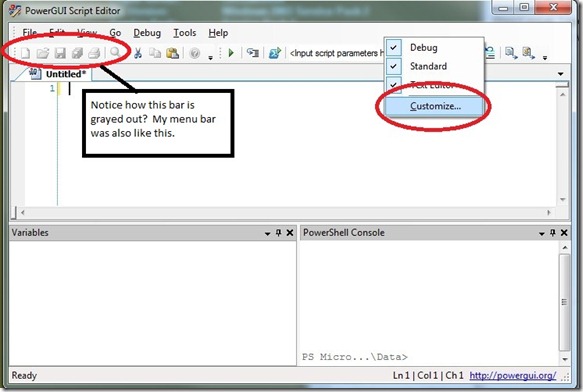
[Update: The config file, named  BarManagerLayoutFile.xml is  likely responsible for this weirdness is located in your user's application data folder.   Win7 - C:\Users\MyUserName\AppData\Quest Software\PowerGUI WinXP - C:\Documents and Settings\MyUserName\Application Data\Quest Software\PowerGUI Play w/ the settings changing them from False to True.  Looking @ my own, most are set to True. ] Summary: Weird issue, I open PowerGUI’s script editor one morning and my menu bar items are all grayed out.  This makes it so that I can't use my mouse to select File, Edit, View, Go, Debug, Tools, or Help.  Reinstallation doesn’t seem to help either. Solution: Right-click in the menu bar area and select “Customize:” Highlight “Menu Bar” and whatever other buttons/menus are grayed out and click the reset button. The Menu Bar and other toolbars should now be un-grayed out unless they are supposed to be. Configuration: Windows 7 64-bit PowerGUI Scrip...

Can't get to Google.com or YouTube.com from Japan...

Image
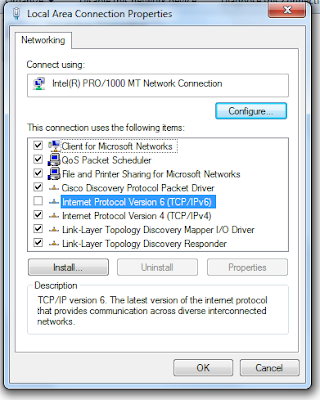
Summary: Ran into an interesting issue today.  Friend from Japan messaged me that they were having issues connecting to Google and YouTube.  I remoted into their computer and found something interesting.  Google and YouTube were resolving to IPv6 addresses. Hypothesis: I'm thinking Japan's ISP's are upgrading their networks to IPv6.  Still, I found it strange that even though Google and YouTube were resolving properly, the pages wouldn't render.  Only those people connected directly to their modem would likely see this issue, if you are behind a router, then this issue would likely not manifest. Resolution: Anyway, to resolve this issue just requires that IPv6 be unbound from the Network Adapter setting in Windows.  Below a sample screenshot from my Windows 7 VM.

Windows 7 Beta

Image
Jumping back and forth between Mac (home) and Windows/VMWare (work) has been fun for the past 2 years. If I had my choice, I'd probably dump Windows at work to exclusively use Mac. Although, I'd been reading that the new Windows 7 addresses alot of gripes people had w/ Windows Vista (I use Vista 64-bit and XP at work). So I've downloaded the Beta and installed on one of my extra laptops. Laptop Specs: Intel Core Duo T2050 1.6GHz 1024MB RAM Intel Mobile 945 Graphics Not the greatest specs in the world, but good enough to trial Windows 7. Install was pretty straight forward, just like Vista. Once I booted into the OS, it was fast and zippy, more so than my Vista box when I first built it. The new windows explorer bar acts much like the Mac dock in that you can 'pin' your applications to it and when run it simply 'highlights' much like the Mac's 'dot'. The one up that Windows 7 has vs. Mac is that it stacks multiple instances in that one '...