Posts

Showing posts with the label ESXi

PowerCLI: Getting HCL DID, VID, and SVID information.

Image
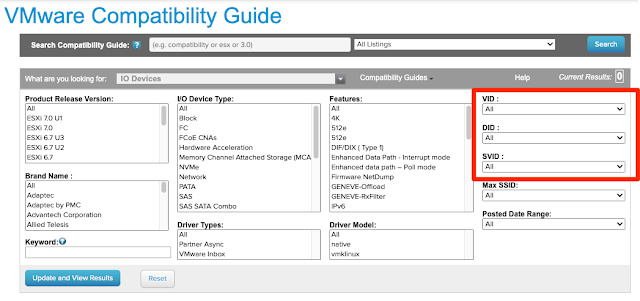
Summary: Searching for IO devices on VMware's HCL list  is easier, if you have data like DID, VID, and SVID.  Thought I posted on this awhile back, but apparently forgot to do so.  Below is a script that you can run on an ESXi host to get those values needed for the PCI devices you are trying to look up.

VMware: Custom ESXi boot iso bootable on Fusion, but not vSphere...

Image
Summary: Building an embedded lab for some testing w/ NSX and everything.  Cannot clone a pre-installed ESXi host w/o some magic, so decided to utilize a simple kickstart script in an ESXi custom iso pre-mounted to my VM template.  Worked fine on Fusion, not vSphere/ESXi though... Workaround: Simply change VM Options --> Boot Options to BIOS Fusion defaults to BIOS, which is why it worked.  I made the iso w/o UEFI options which is why it worked on fusion, but not ESXi VM. OR Solution: The command I was using to make the iso was missing some key new features to make the iso UEFI bootable. mkisofs -relaxed-filenames -J -R -o ~/Desktop/custom_esxi.iso -b ISOLINUX.BIN -c BOOT.CAT -no-emul-boot -boot-load-size 4 -boot-info-table -eltorito-alt-boot -eltorito-platform efi -b EFIBOOT.IMG -no-emul-boot ~/Desktop/ESXiDefaultInstall You will have to modify two BOOT.CFG files, one in root directory, and the other in the EFI subdirectory to utilize any custom kick...

VMware: vxlan to vxlan traffic randomly fails or only works on the same ESXi host...

Image
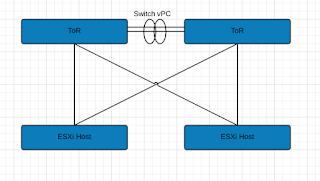
Summary: Here are the basics: Leaf/Spine Architecture (Basic illustration only show ToRs) Basic Illustration for explanation purposes vSphere 6.5U1 / vSAN 6.6 NSX 6.3.3 Multi-VTEP Deployment w/ LoadBalance-SRCID Standard VLAN for VTEP connections. 2x Nexus 9K ToRs Dell R630's Long story short, Switch vPC's were stripping VLAN ID info before sending to peer ToR then to ESXi host.  ESXi host dumped it causing these strange issues.  Load Balance SrcID w/ Multi-VTEP made this especially difficult to figure out because of the basic randomness.  Switch vPC link has a configuration advantage, so in order to keep it, we ran additional links between the switches to make some standard trunk connections.  Once done, we configured our NSX VTEP VLAN network to traverse those trunk connections rather than the vPC.  This resolved our stripping issue. See past page break for tools and more details on what we (mostly vmware NSX senior support staff) did to ...

VMware: ESXi 6 503 Service Unavailable endpoint: [N7Vmacore4Http16LocalServiceSpecE:0x1f098b08] _serverNamespace = / _isRedirect = false _port = 8309)

Image
Summary: Basically I enabled SR-IOV on the only two pNIC's I had in my ESXi host in my lab.  This doesn't necessarily cause a connectivity problem, but the ESXi management agents did not like this at all.  Meaning I could connect to my hosts, as evident in the error message, but the agents basically broke once SR-IOV was enabled on the only two physical uplinks I had. Workaround: Unfortunately, the only workaround I've found is to: "Reset System Configuration" from DCUI This basically bring ESXi back to default install config.  root password is blanked out, etc. etc. or Re-Deploy the host.  For my testing though, I can enable on one of the physical uplinks and work w/ that just fine, just not both in my case.  The other aspect that I didn't realize is that the CNA cards I was using lose their Fiber Channel connectvity as well. SR-IOV effectively changed my CNA cards to NIC adapters only. Config: ESXi 6.0 Build 5050593 Dell FX2 - FC630 -...

Did you know? Running ESXi on Macs has licensing caveats...

Image
Did you know that according to Apple's OS X EULA, you are only allowed to run 2 OS X VM instances per physical device? So what does that mean for running ESXi on a Mac Pro?  You can only run, legally , 2 OS X VM's on it. http://images.apple.com/legal/sla/docs/OSX1010.pdf How's them apples?  Kinda sucks, wondering what other people have done to get around this?  Mac Mini value was much better w/ vSAN when it had two internal disks (for the server version). Really the only option is to talk to your Apple rep and see how you can license more.

PernixData: What is it? Does vSAN render it obsolete?

What is it?: Simply put, it's flash acceleration.  You install a VIB in ESXi and register the PernixData Management (virtual management appliance) plugin to vCenter.  You can then take flash drives from each of your ESXi servers and clump them together to make a flash tier across all your hosts. Does vSAN render it obsolete?: Not really, it's a good solution to augment any existing SAN you might have.  It also won't require much change.  The scenery maybe changes as vSAN increases its configs max and traditional SANs fade, but that probably won't be for a long while. The cool things: You can use any SSD you want.  You don't have to purchase high-end or vendor specific SSD's. Reads and Writes can be accelerated. If the SSD fails, if configured, replicates that write to another SSD in the cluster. Yes, you would use network bandwidth @ this point only until the failed SSD is replaced. Most flash caching will only do reads because write redundanc...

Newer Processor = Faster Performance? Sometimes...

Summary: We were receiving reports of some developers experiencing a degradation in JVM compile performance and general compiled application performance.  We had just recently vMotion'd these VM's from HP G7 systems w/ Westmere processors to newer Dell M620 blades running Sandy Bridge Processors. Long story short, applications compiled on Westmere don't take advantage of a new AVX CPU extension available on Sandy Bridge, which in turn is only made available in RHEL 6.2 and newer kernels.  I'm not sure if Windows would be affected in the same way, but this was a definite issue in RHEL 5.8. The performance delta was not 'huge' but enough in terms of scale.

NFS: Unable to create datastore: The specified key, name, or identifier already exists.

Image
Summary: I have a shared NFS datastore mapped to all my hosts.  So I found it strange that two hosts in a cluster of 5 were not seeing it.  When I would try to map it, I would get the following error: Unable to create datastore: The specified key, name, or identifier already exists. This worked for me: It seems I had an old mapping in place that wasn't showing up in vCenter until I refreshed the storage view to show the 'inactive' mount: Once the inactive mount appeared, I was able to unmount it, then remount the correct path. [If the refresh doesn't work, you may need to SSH to the host and run the ESXCLI commands listed toward the bottom of the post] I found it interesting in that running "vicfg-nas <a bunch of connection options here> --vihost myesxserver -l" did not list this inactive path either.  It might have shown up if I connected directly to the ESXi host w/ the vSphere client, but I did not check. ESXi 5, you'll need to use t...
Testing Port Connectivity from an ESXi host

Summary: I'm so used to testing connectivity to an ESXi server from a windows or Linux system, that I never thought about how to do it the other way around.  It took me a bit to find it so I figure I should post on this for my reference @ a later date. The key command from the CLI: nc (aka netcat) nc -z DestinationIP DestinationPort -v Example: In my case, I was trying to get Emulex onecommand to download and install firmware to my HBA's.  Emulex onecommand was running on my tools server on ports 8080 and 8443.  To test my connection, I passed the following command: nc -z myToolsServerIP 8080 -v and nc -z myToolsServerIP 8443 -v The commands would just hang, meaning the ports were not responding.  A quick e-mail to my firewall teams and they were able to fix the problem by opening up the ports. VMware KB: 2020669 http://kb.vmware.com/selfservice/microsites/search.do?language=en_US&cmd=displayKC&externalId=2020669

NAT's + vCenter = BAD

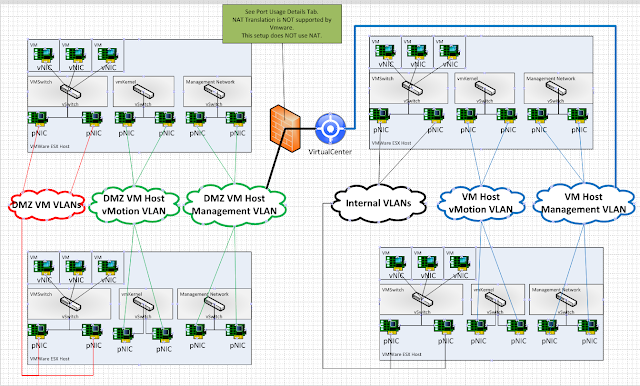
Summary: vCenter was able to connect to and seemingly manage hosts fine, however when a user attempts to clone, an error "Cannot connect to server" is returned.  NAT's are NOT SUPPORTED .   That being said, here is what I did to track down what was causing this issue. Details: First I tailed the vpxa.log while I attempted a clone.  What I found was actually quite interesting.  When attempting the clone, @ some point w/ the destination IP of the ESX host was changed.  It ended up targeting an IP to which I was unaware of what that IP might be. So I performed a traceroute from vCenter to the ESXi host.  It turns out the IP was a firewall in the route. With the firewall IP in hand, I went to the firewall security team and had them check the settings.  Turns out there was a source NAT setup that was causing me the errors.  Once that was removed cloning worked w/ no problems. From my perspective as a VMware admin, I would have had no ide...

Configure ESXi Scratch Config w/ Powershell/PowerCLI and other advanced settings...

Summary: Needed to script configure all my 100+ ESXi hosts w/ a scratch location.  Having a permanent scratch location configured is helpful when an error such as a purple screen of death (PSOD) occurs on ESXi.  It is not a requirement, but definitely a best practice. PreRequisites: Powershell 2.0 + PowerCLI 5.1 + vCenter 4.1 + Local or Shared Datastore Local is easy if you standardize on naming of a local datastore.   I'll focus on this in my script example. Shared Datastore essentially accomplishes a similar goal of a remote syslog server, you'll want to be sure to separate logs to their own individual directory. Scaling may become an issue unless you focus these shared datastores among clusters rather than all hosts. Details:

ESXi Hosts Timing Out During HA Cluster Election

Image
[Guest Post by Jeremy Reiman ] Summary: ESXi hosts timing out during HA cluster election phase after cluster master is selected.  The HA Agent status in vCenter shows as unreachable on all hosts that timed out. Symptoms: ESXi host fails to enable HA Agent and shows error "operation timed out". Error message "[ClusterManagerImpl::IsBadIP] x.x.x.x is bad ip" showing in /var/log/fdm.log on ESXi hosts. TCPdump capture from ESXi host shows packets destined for IP address of other ESXi host are being sent to the MAC address of the firewall.  These should be going to the MAC address of the ESXi host management interface since both reside on the same VLAN. Configuration Info: ESXi host managment interfaces are on the same VLAN. ESXi 4.1 + Firewall is a Cisco ASA5500 running IOS 8.2(2) . Firewall Switch Module running 3.2(5) is also applicable. All network ports are open on the firewall between the vCenter server and the ESXi hosts. Resolution: Disa...

Uninstall HA agent manually

This is something you’ll likely have to do on a rare occasion.  In case you do though, here is the info need to do so. Disable HA on cluster. SSH into ESX/ESXi box Run the following: # Stops management services /sbin/services.sh stop # Runs uninstaller script /opt/vmware/uninstallers/VMware-aam-ha-uninstall.sh # Sometimes has problems removing the below directory, so we help it. rm -rf /opt/vmware/aam # Restarts management services /sbin/services.sh start