Posts

Showing posts with the label Network

Azure VMware Solution: NSX-T Active/Active T0 Edges...but

Image
Summary: Azure VMware Solution (AVS) delivers by default w/ a pair of redundant Large NSX-T Edge VM's each running a T0 in active/active mode.  So why is my traffic only going out one Edge VM? Short answer: The default T1 that is delivered w/ AVS is an active/passive T1 where you connect your workloads to.  So while it could technically take either T0, it's always going to go out the closest T0 to the active "SR" T1.  Where do the SR's live?  You guessed it, on the Edge VM's.  As you can imagine, this can lead to a bottleneck if you try to shove all your traffic through a single Edge VM. Simple Diagram: Longer answer with Options:
VMware: vxlan to vxlan traffic randomly fails or only works on the same ESXi host...

Image
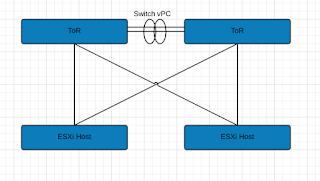
Summary: Here are the basics: Leaf/Spine Architecture (Basic illustration only show ToRs) Basic Illustration for explanation purposes vSphere 6.5U1 / vSAN 6.6 NSX 6.3.3 Multi-VTEP Deployment w/ LoadBalance-SRCID Standard VLAN for VTEP connections. 2x Nexus 9K ToRs Dell R630's Long story short, Switch vPC's were stripping VLAN ID info before sending to peer ToR then to ESXi host.  ESXi host dumped it causing these strange issues.  Load Balance SrcID w/ Multi-VTEP made this especially difficult to figure out because of the basic randomness.  Switch vPC link has a configuration advantage, so in order to keep it, we ran additional links between the switches to make some standard trunk connections.  Once done, we configured our NSX VTEP VLAN network to traverse those trunk connections rather than the vPC.  This resolved our stripping issue. See past page break for tools and more details on what we (mostly vmware NSX senior support staff) did to ...

VMware: Migrating Management(Mgmt) vmk to DVS/VDS fails when moving both vmnic and vmk at the same time.

Image
Summary: Quite simple, had a script to move physical nics to DVS/VDS w/ management vmk at the same time.  Typically this works w/o issue, but for some reason kept failing.  The answer was dead simple... Resolution/Workaround: Spanning Tree Enabled? Enable portfast on the switch ports. Or Spanning Tree not available? Move one physical link at a time (assuming more than one physical link available) Wait for uplink on DVS to come online, then move management/mgmt vmk Explanation: Basically, the switch ports that the ESXi servers were uplinked to did not have ' portfast ' (physical switchside config) enabled.  Without ' portfast ', when moving a physical nic from a standard vSwitch (or vice versa), there is a negotiation downtime the host incurs as the switch/host essentially renegotiates the connectivity.  It's a short window (5-10 sec) that the port goes 'offline', but it's enough for the migration of vmk and physical nics at the sam...

Turbonomic/VMTurbo: Testing target port connectivity from appliance (network troubleshooting tools)

Image
Summary: Attempting to troubleshoot IP and port connectivity issues on a Turbonomic appliance is a bit difficult.  The target configuration 'target status' doesn't really give enough information and the default toolset in the appliance ssh session doesn't provide telnet, traceroute, or netcat.  As long as your appliance has internet access, you can install these tools fairly easily though. Details: Quite simply, assuming nothing changes later, the appliance runs OpenSuSE.  You can make use of zypper to install the additional tools needed such as netcat, telnet, and traceroute: zypper install netcat-openbsd Usage of netcat is the same as ESXi which you can reference here  or use 'man netcat'. Installation of telnet and traceroute are a bit more straightforward: zypper install telnet zypper install traceroute Notes: These tools simply give you an idea of connectivity from the appliance's perspective. Traceroute can help you determine if anyt...

NAT's + vCenter = BAD

Summary: vCenter was able to connect to and seemingly manage hosts fine, however when a user attempts to clone, an error "Cannot connect to server" is returned.  NAT's are NOT SUPPORTED .   That being said, here is what I did to track down what was causing this issue. Details: First I tailed the vpxa.log while I attempted a clone.  What I found was actually quite interesting.  When attempting the clone, @ some point w/ the destination IP of the ESX host was changed.  It ended up targeting an IP to which I was unaware of what that IP might be. So I performed a traceroute from vCenter to the ESXi host.  It turns out the IP was a firewall in the route. With the firewall IP in hand, I went to the firewall security team and had them check the settings.  Turns out there was a source NAT setup that was causing me the errors.  Once that was removed cloning worked w/ no problems. From my perspective as a VMware admin, I would have had no ide...

Finding local networked devices via your Mac’s web browser by name instead of IP.

Image
Summary: Unable to connect to locally available network devices via their friendly name. Config: Mac OS 10.x (10.5 or 10.6) Details: I’ve found this to be only true for Macs. For example: When I try to connect to my NAS’s web admin console via the name I gave it ( http://zterastation ), my Mac cannot resolve the name. Yet, my Mac does find it by name in the list of available drives to connect to. Seems the fix is simply to append ‘.local’ to a locally available network devices friendly name. As so, http://zterastation.local . This could simply be in the way my router configures my DNS entry order, but does not seem to matter to my windows systems.

iPhone 2.0+ (iPhone or iPhone 3G) Enterprise Configuration Tool

Image
In order to join your iPhone 2.0+ to your corporate secured wireless network that uses PEAP or other protocol, you have to use the iPhone Enterprise Configuration Tool. It's not possible to configure it from the phone itself apparently. Seems there are two ways to get the configuration profiles onto your iPhone: Via the web, by hosting the .mobileconfig file on a network accessible IIS or OSX Server. E-mail the config file to your phone. iPhone Enterprise Config Tool: http://www.apple.com/support/iphone/enterprise/ iPhone Enterprise Config Tool Deployment Guide: http://manuals.info.apple.com/en_US/Enterprise_Deployment_Guide.pdf

WRT600N Bugs..

Image
Summary WRT600N Firmware 1.01.36 Build 3 provides DHCP clients w/ DNS entries in a strange order. ISP's DNS -> Router -> Your static DNS entries By and large, I really like my WRT600N router. The thing is so dang versatile, but be warned it is not without it's issues. I'm currently using the latest firmware build 1.01.36 Build 3. There seems to be issues w/ the router's DHCP server. It issues DNS addresses in a weird order. It provides systems w/ the ISP's DNS servers as your primary and secondary, then the router itself as a tertiary, followed by any static DNS entries you've entered yourself. For most people this isn't an issue, but if are doing any kind of home networking, this leads to issues resolving local system names. Since the first thing your clients try to resolve a name against would be your ISP's DNS servers. They wouldn't have the first clue where to find "mylocalsystem". Windows is pretty good about this though ...

Linksys WRT600N and Macbook Pro

Image
Summary: When assigning a SSID, be sure to assign a different name for your 5GHz and 2.4GHz spectrums. This also helps in differentiating which network you are connected to. Under "Applications and Gaming" --> "QoS", disable WMM Support. WMM Support seems to have a negative effect on Video Streaming if your wireless card does not have WMM support. So here is an interesting story. I recently purchased a linksys router, a one WRT600N. This router has the capability to host a 5GHz and a 2.4GHz wireless network at the same time. Cool, I thought, at least when I get a 5GHz card I can use it. Low and behold my mac can connect to the 5GHz spectrum. Anyway, I seemed to be having issues keeping all my computer connected at once. Any time my mac came online all my other PC laptop systems kept dropping off. What it came down to was the fact that I had named my SSID the same for both spectrums. Now mind you, I don't think that should normally cause a problem, but ...

Firewall Windows XP/Vista

Image
In a previous post I talked about free tools you can use to protect, prevent, and remove spyware, trojans, viruses, etc. What I forgot to mention was a critical and important piece, the firewall. Both Windows XP and Vista come built-in w/ a software firewall. You want to make sure it's turned on. Most computers installed with Windows XP or Vista have this turned on by default. If you have Norton, McAfee, or TrendMicro they may have provided you w/their version of a firewall. Most often Windows will warn you if you do not have your firewall turned on. But if you want to be sure, you can follow these steps(Windows XP): Click Start Click Control Panel (or Settings, then Control Panel) If in classic view(many icons) double click the Windows Firewall icon. If in Simple View like pictured below click "Security Center" By following these steps you should be able to see whether your firewall is turn on or off. Windows Vista: Click the Windows Icon (usually located on the bo...