Posts

Showing posts with the label vCenter Operations

vRealize Operations (aka vROps) formerly vCenter Operations (aka vCOPs) Dictionary

Image
Found this on a community board  and well, thought it might be useful to repost.  Also looking to add to this as time permits. Term Definition Ascendant Any object higher in the "tree", includes parent (and grandparent, great-grandparent, etc) Parent Object directly above selected object (VM's parent is a host, for example.  Host parent is cluster, etc) Child Object(s) directly below selected object in the "tree" (host child(ren) is any VM on host) Descendant Any object lower in the "tree", include child, grandchild, great-grandchild etc The above information is useful when creating group objects and what not in vROps.

vRealize Operations @ AutoTrader.com (Cox Automotive)

Image
My customer testimonial for VMware's vRealize Operations and Log Insight offerings.  Feel free to e-mail over any questions to me: QA@zsoldier.com Cox Automotive AutoTrader.com KBB.com

Updating vCenter Plug-in Registration URL's (from IP address to DNS) using PowerCLI

I've found this post by  Josh Perkins  helpful in more ways than the one demonstrated.  It's allowed me to not only update my vcops plugin registration w/ vCenter, but also helped me to update my Dell vCenter plug-in so that it connects via its DNS address rather than its IP. http://www.vstable.com/2012/04/02/vcenter-operations-5-x-vcenter-plugin-uses-ip-instead-of-dns-hostname/ However, I decided to explore the possibility of using PowerCLI to fix these registrations. Turns out you can and the change is immediate, so you don't have restart the vCenter service. YAY!  No more cert errors!  You still have to ssh into the vCOPs UI vm and update the viClientConfig.xml file, but that's easy enough. Here is my result (specifically for vCOPs): $BaseURL = " https://myvCOPsRegisteredDNS.Name.local " $ExtURL = " /vcops-vsphere/ " Connect-VIServer my1stvCenterServer, my2ndvCenterServer Foreach ( $DefaultVIServer in $global:DefaultVIServers...

SCOM Adapter Configuration for vCOPs

Image
Summary: I wanted to test the SCOM adapter in vCOPs to see what data I could get and see how it could be used.  Unfortunately, the VMware video demonstrating it's installation did not work for me without some tweaks. Config: vCOPs 5.7.1 (vApp) SCOM Adapter Build  1036195 Installing the Adapter: Log into your vCOPs admin page (Usually https://vcopsServer/admin) Select the Update tab and upload the 'pak' file Accept the EULA, wait. Pretty much the same as updating vCOPs  @ this point. Once completed, you need to log into the custom UI (https://vcopServer/custom) as an admin. If you setup LDAP and made your account an admin, you're good.  Otherwise, you can login as the same admin account as the admin page. Once in the custom UI screen, hover over admin and select 'support' Select the 'Info' tab, click the gear to start the 'describe' process. Once the process is completed you should see the SCOM adapter availabl...

VCM5034 - Troubleshooting w/ Log Insight and vCOPs @ Cox Communications Extras!

We unfortunately did not demo the vCOPs integration w/ Log Insight.  I did record those videos though so I figure I would share them here.  No audio, but just videos. Here we are demonstrating the 'context' awareness menu where you can select an object in vCOPs, in this case a VM, and jump into Log Insight w/ a pre-populated query.  It's only context aware from the aspect of object selection, meaning, the VM and the host it's running on, but imagine the integration possibilities. This second video just shows how you can make custom queries and just by aspect of those entries showing up, send an associated alarm to vCOPs for tracking/notification purposes.  The video shows you the idea of finding 'cloned vm' entries and having log insight insert those as a specific type of alert in vCOPs.  The video is poorly edited and is meant to show you the 'concept': Anyway, feel free to post comments here.  I'm always monitoring and willing to answe...

VCM5034 - Troubleshooting w/ Log Insight and vCOPs @ Cox Communications.

Image
My coworker Mike Regan and I submitted a session for VMWorld and we were accepted.  Our session is scheduled for Tuesday August 27th @ 11:30am.  Bring your lunch and see us demonstrate how we use vCOPs and Log Insight in our daily lives. Unfortunately Mike won't be able to make it, so my other coworker, Jason Davis, will be taking his place. We'll try to keep you entertained, but if you need to throw-up in the middle of our session, please step outside to do so.

vCenter Log Insight release

Image
vCenter Log Insight is a new log aggregator from VMware. As a new tool that is integrated with vCenter Operations Manager, Log Insight has great potential. The ability to tie in directly with VMware's knowledge base, vCenter and vCenter Operations gives Log Insight a true strength in combining analytics with logging. We started using Log Insight (project Strata) at Tech Preview 2. We had a need for log aggregation solution and thought we'd give it a try on our lower environments. We have used it for different purposes. 1st time was with analytics. when we deployed it, I had setup a dashboard to see "warning" level alerts. 3 of our 120 hosts were far surpassing the others in errors.  After clicking down into the bar graphs we saw a high number of Active Directory related errors.  After rejoining 2 of those hosts to the domain the errors had cleared. The third box we needed to reinstall to clear the errors. Since we've done this all the servers have ...

Replacing vCenter Operations Manager Certificate (vApp)

Refer to this post for openssl info , then follow the steps here: Generate a certificate signing request openssl req -out vcops.csr -new -newkey rsa:2048 -nodes -keyout vcops.key Answer the wizard questions appropriately for your environment. This creates your Certificate request and generates the associated private key. When you receive your signed cert from the CA if not already in pem format (with private key): Assuming CER or CRT we need to convert it to PKCS12 first. openssl pkcs12 -export -in vcops.cer -inkey vcops.key -name vcops -passout pass:password -out vcops.pfx Convert to PEM w/ private key openssl pkcs12 -in vcops.pfx -out vcops.pem -nodes It will prompt for password, if you used my example under step 2, then that would be password. Log into vcop's admin console (https://vcopsServername/admin), select the SSL tab, and upload your newly created pem file. Additional Steps: These steps were helpful in updating vCOPs registration info in vCe...

vCenter Infrastructure Navigator Removal How to.

Summary: A very cool little appliance that looks @ your VM's and everything they interact with.  Unfortunately, the installation can be fraught w/ issues.  I for one found a bug w/ vCenter 5.0 and VIN 1.1.1 (where VIN 2.0 might have been introduced before).  Specifically, I was unable to apply a VIN 1.0 license to my VIN 1.1.1 installation because I tried to introduce VIN 2.0 first.  Interestingly, my 2.0 key worked fine w/ the 1.1.1 version. Long story short and to make it simple don't introduce VIN 2.0 unless you are on vCenter 5.1. PreReqs for 5.0 users: vCenter 5.0 VIN 1.1.1 vCenter Web Client 5.0 Details: If you have not deployed VIN ever to your 5.0 environment, then I recommend you deploy VIN 1.1.1 and save yourself some headaches.  Otherwise, here are some remediation steps you can take to deploy VIN if you did what I did or set it to auto-upgrade w/o knowing better. Steps to Remove VIN extensions from vCenter Remove VIN...

Posting last known good backup to vCenter Custom Attribute (NBU 7.5)

Thought this was kind of a cool function of Netbackup 7.5.  It has the ability to post last good backup date to a vCenter custom attribute.  Here is the article: http://www.symantec.com/business/support/index?page=content&id=HOWTO71014 The short of it is to simply add the extensions ( Register extension, Unregister extension, Update extension ) permissions to your NBU role on top of those perms listed here: http://tech.zsoldier.com/2011/06/netbackup-perms-and-vsphere-4x.html and configuring vmware advanced attributes in netbackup 7.5+. http://www.symantec.com/business/support/index?page=content&id=HOWTO70998#v62458854 <-- Pointed out by Michael in comments. Cause I forgot to add it.  -->

vCenter Operations 5.x vApp LDAP Configuration

Image
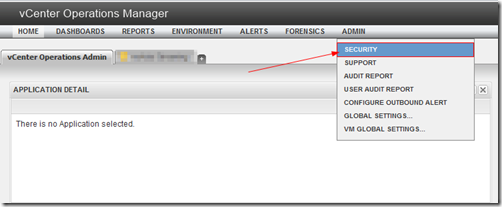
Summary: I happened to see someone searching for this and coming across my previous post on it’s wonkiness , so I figured I’d make a post showing how I went about configuring it w/ an Active Directory domain.  This only applies to the vcops-custom page.  The standard vCops-vsphere page uses vCenter’s authentication via role permissions. Details: Log into your vcops-custom page as an admin. (example http://yourvCOPsUIvmIP/vcops-custom ) Select Admin –> Security Select the Import from LDAP button Select the add button Now see the screenshot below to see how to fill out the configuration screen: Below details how the auto-sync works: You’re pretty much done @ this point. Auto Sync occurs once every hour, so once you configure it, it’ll take approx. an hour before users are granted access.  The other caveat is that nested groups are not supported.  Users must be direct members of the security group you setup w/ Auto Sync. Feel free to ask q...

vCOps Enterprise 5 vApp LDAP bug? (One or more users already exist and haven’t been imported)

Image
Summary: I had been having issues w/ our deployment of the  vCenter Operations vApp.  The Web GUI interface has two pages, https://vCopsServerName/vcops-vsphere and https://vCopsServerName/vcops-custom .  It seems vcops-vsphere simply uses vCenter privileges to determine whether you can login and what you can view.  vcops-custom however does not and has a separate set of permissions it uses to determine a user’s access authority.  They both however utilize the same useraccount table in the postgres database. Workaround: This KB contains the steps needed to workaround the LDAP import problem: http://kb.vmware.com/selfservice/microsites/search.do?language=en_US&cmd=displayKC&externalId=2013440 Step 2 was incorrect as of this post date, it should read as follows: # su postgres # psql -d alivevm I’ve let VMWare and @VMWareKB know of the typo.  So it should get corrected. Details: I found that when I login into vcops-vsphere, it uses my permissi...