Posts

Showing posts with the label UCS

UCS LDAP Authentication "Domain Users" will not work

[Update: Cisco has opened a bug for this.  Expected to be fixed in 2.2 release, but you can track the progress here:  CSCui60138 ] Summary: In my previous post, I hypothesized that "Domain Users" simply contained too many members.  I was wrong. Details: After performing a couple of packet captures, I found that "Domain Users" was not an attribute returned in the "memberOf" property.  This seems to be a known response as "Domain Users" is typically classified as a "PrimaryGroup" and is therefore recorded in the "PrimaryGroupID" attribute. Since UCS is only looking @ the "memberOf" attribute, "Domain Users" would not be returned.  I've made Cisco TAC aware of this discovery.  Whether it gets added as a bug or is simply relegated as a low hanging feature request is anybodies guess.  In the very least, I feel better to get this monkey off my back. UCS Version: 2.1(1a) UCS LDAP Workflow (as how...

LDAP UCS Group Maps w/ AD groups more than 1000 members bug?

Image
[SHORT UPDATE: My hypothesis was wrong] [FULL UPDATE: Click here] Summary: Seems like I always run into bugs w/ UCS's LDAP and AD integration.  This time it appears that UCS has issues w/ associating users that are members of AD groups that contain more than 1000 members.  I say 1000 members because in all likelyhood UCS's programming is calling this method: http://msdn.microsoft.com/en-us/library/windows/desktop/aa366953%28v=vs.85%29.aspx Details: In my case, I was referencing 'domain users' and granting read-only.  Testing the users from the CLI interface would show that the user account would authenticate just fine like as follows: connect nxos test aaa server ldap nameofADserver usernametoTest cleartextpassword user has been authenticated Screenshot: In the end, the problem seems to be that UCS is unable to map the user to the group that grants the UCS role access because of the 1000 member limit. Workaround: Quite simply, map an AD group that ha...

vCenter UCS Alarm: IPMI SEL, SEL_FULLNESS

Image
Summary: This alarm means that server's CIMC system event log has filled up.  Below you will find the steps to clear this type alarm. PreReq: This assumes you are utilizing B-series UCS servers.  C-series may be slightly different in practice. Resolution: If you're vCenter is configured w/ default alarms, you'll likely see something like pictured below in vCenter under the hardware status tab: To clear this alert, you'll need to empty the SEL Logs in UCS of the blade related to your service profile.  You are not likely to find SEL Logs as part of the service profile. Once you've opened the related blade, select the SEL Logs tab.  Review and/or export the logs so you simply do not clear something that may need to be investigated.  Once done, you can safely clear the logs: Once the SEL Logs have cleared, the alert in vCenter should reset to green in a few minutes.

How to: tcpdump UCS Management traffic.

Rather than regurgitate all the information whole here is the skinny: SSH into your UCS chassis (aka primary fabric interconnect) connect nxos ethanalyzer local interface mgmt limit-captured-frames 2000 write volatile:/mycapture.cap ethanalyzer is the command local is default interface so we can tell it where we want to capture packets from. mgmt is the one I'm interested in limit-capture-frames is there because it limits to 10 by default and is way too fast when troubleshooting. write to output a capture file located in volatile memory (deletes when FI is rebooted.) Exit connect local-mgmt cp volatile:/mycapture.cap scp://username@linuxservername/somepath Where 'scp' is defined, can be ftp, sftp, tftp, volatile, or workspace as well. The capture file can be read in applications like wireshark . This helped me figure out my LDAP Authentication issues . Full article and explanation of how to do what I've outlined above was found here: http://...

UCS bug around Active Directory

Update: UCS 2.1  addresses this particular issue.  Bug ID:   CSCth96721 Summary: Found an interesting UCS bug on 2.0(3b) .  May be resolved in 2.0(4d) , but have not tested yet.  This particular problem only manifests itself if your Active Directory tree structure is elaborate and causes a user account's distinguishedName to be longer than 128 characters. Detailed: Essentially UCS queries Active Directory w/ samAccountFilter, it receives the results of the query.  It then makes a bind call against the DN using the results it received.  The problem is the DN bind call variable on the UCS side seems to be limited to 128 characters which it then truncates the information when it makes the bind call. Workaround: The only real workaround is to move the affected account to another a higher level OU to shorten it's distinguished name. Powershell: You can use powershell to determine the length of your distinguished name by utilizing the Quest Acti...

UCS SSH LDAP Login Syntax

Image
Summary: Login syntax using LDAP to Cisco Fabric Interconnects. Linux/Mac: Syntax: ssh ucs-authdomain\\username@UCSIPAddressORDNSName Example: ssh ucs-tech.zsoldier.com\\zsoldier@ucs.tech.zsoldier.com Windows/Putty: Syntax: ucs-authdomain\username Example: ucs-tech.zsoldier.com\zsoldier

UCS F0401 <-- Really annoying error

Image
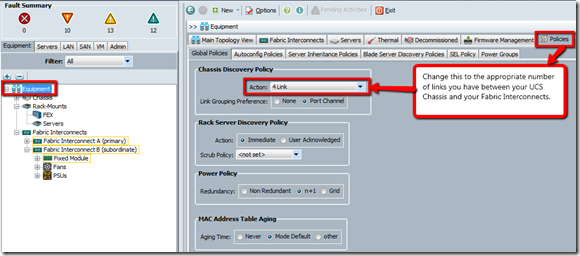
Summary: It had these ‘faults’ showing up on Chassis.  The error was rather vague, but one thing that hooked me was the idea that there was a ‘discovery policy’ incorrectly configured. Resolution: Find and change the discovery policy: Decommission the Chassis Recommission Chassis Voila, those errors should go away if you selected the correct discovery policy for your configuration.