Posts

Showing posts with the label Python

Bash, Applescript, and Sshuttle (Python): Creating a multi-jump into the multiverse...

Image
via GIPHY Summary: Basically, I work through VPN's most of my existence.  The problem lies when I have to switch to different VPN's it disrupts my communications w/ other tools that only exist in one VPN, but not the other.  There does appear to be tools around some of these things, but I wanted something quick and dirty.  AND DIRTY it is.  This enables me to stay connected to the main VPN and cheat by sshuttle'ing through systems of access temporarily. Details: I'm using MACOS and to launch a terminal in a new window turned me on to AppleScript.  I wanted to pass two variables. 1st was basically an identifier for the end system I wanted to shuttle my traffic through. 2nd was to pass a password variable to any system inbetween that was not setup w/ my SSH public key. So I made a bash function, to call applescript to open my terminals to run what is effectively a python binary.  It works, but has several prerequisites for it to run smoothly....

Python: Using VS Code on Mac pylint errors

Image
Summary: Having python built in on Mac can cause issues when you try to work python code.  One such issue is that VS Code will consistently complain about pylint missing and will attempt to install.  It'll likely fail every time and also show a nice little warning suggesting to upgrade pip to the latest version.  Slight annoyances, but annoying nonetheless. If you've installed Python 3 using brew based on my last post, then this'll be a helpful continuation. Python: Modules installed with PIP3 on Mac not getting installed? Resolution: It's quite simple. Launch Visual Studio Code Code --> Preferences --> Settings In the right pane User Settings, simply add your preferred python path. "python.pythonPath": "/usr/local/bin/python3" brew places a pointer here for you if you followed my last post. Save You can also set your preferred interpreter on-demand rather than statically setting it in your user settings.  See referen...

Python: Modules installed with PIP3 on Mac not getting installed?

Image
Summary: I was essentially just trying to import a module for my python3 installation, but found it was not installed.  Typically, you should be able to install it via PIP (PIP3 in Mac case so it would install to 3.x version instead of built-in 2.x version).  It appears to install fine, but it would not appear in my installed modules when calling help("modules").  Then I noticed the problem... Details So in my case, I had python 2.7 and python 3.5 installed via the standard packages provided by python.org.  Nothing wrong with this and very typical, but my tinkering screwed me because I also use brew package installer.  This likely got my pip3 installation messed up and out of sync w/ standard packages installed.  My pip3 pointer was going to a 3.6 version whereas my python3 pointers were going to 3.5.  So, if not obvious, calling pip3 to install modules would only be good for python 3.6. ls -lh /usr/local/bin pip3 --version Now my unde...

GeekTool: Geekweather2 auto-geolocation updated w/ city name

Image
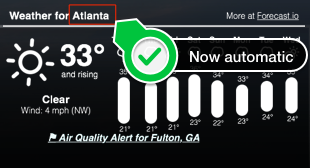
Continued from:   http://tech.zsoldier.com/2014/11/geektool-geekweather2-w-auto-geo.html I briefly looked through the corelocation framework .  Looks like the CLGeocoder Class could return friendly names, but I've been playing w/ Python lately so took that route for now. Be that as it may, wrote a little python script to take the latitude and longitude results from locateme to have it return city name from Google mapping API's.  I also updated the geekweather2.sh script to accept "Names" that have underscores and/or spaces.  The python script needs work as I'm kind of guessing w/ the return I get from geopy . I'll look into it more just out of curiosity, but if you have a chance, would love for someone to update my gist to determine city more accurately. PreReqs: Install geopy module for python pip install geopy Below is my fork of geekweather2.sh: https://github.com/Zsoldier/GeekWeather2/blob/master/geekWeather2.sh Below is what th...