Posts

Showing posts with the label Dell

Nutanix: Deploying the Dell XC series

Image
Adventures in deploying the new Dell XC (Nutanix) series systems.  Initial install of a Nutanix based system. PreRequisites (per XC630 1U system): 2x 10Gb Ports <-- Trunk Ports 1x iDrac Port <-- This is for your out of band management. We get these DHCP enabled by default so we can access them the minute their connected. IPv6 Link-Local Enabled on switch (Recommended/Preferred) Typically enabled by default on modern switches This enables the Nutanix Controller VM's discover each other immediately. You'll need to attach a device physically to that switch Or a VM to that switch to start configuration. This will allow you to setup via a snazzy web interface. If IPv6 Link-Local is unavailable  on the switches, then the setup involves logging into each CVM to perform manual cluster creation. This can be done by logging into each ESXi hosts' shell to ssh into each CVM's local network connection attached to the vSwitchNutanix Interface. This c...

Converged Networking Perils...

Image
Summary: Had a wonderful experience where a P2V VM w/ bonded NIC's brought down several of our ESXi hosts.  HA compounded the problem by powering up the VM on other hosts once the host w/ this VM was brought down.  The perils of converged networking and why it's important to keep your ESXi management/storage separate from your other physical ports.  If these were 'physically' separate, the problem would have isolated to one host and prevented the cascading HA events. Here is the config in short: Dell Blade two nPar'd 10Gb ports --> Internal Dell I/O aggregator ports --> External Dell I/O aggregator ports --> Nexus 5K Management, vMotion, NFS, AND VM traffic go over these two ports. One port goes over Fabric A, the other over Fabric B.  Two physically separate uplinks. What happened: VM w/ bonded NIC's comes online.  This seemed to cause a 'spanning-tree' like event which caused the Internal Dell I/O aggregator ports to go into an...

Get Dell ESX host warranty info via PowerCLI version 3

Image
Summary: Had a script that was doing a screen scrape of Dell's support page for warranty info.  Now they require a log in.  So it was time to finally revise my script to use Dell's wsdl (SOAP) interface. Example: Details: I was able to simplify the script a bit using the code provided by Jon Gurgul to pull from Dell's provided SOAP service.  I copied the code into a Get-DellAssetInformation.psm1 file so I could call the function as a module. The variable you should probably update is the $ServiceDescription variable to match the warranty type you expect from your boxes so you get an actual return of data. I simply plugged this into my existing code removing the screen scrape code and this is what I ended up with: Script: Add-PSsnapin VMware.VimAutomation.Core #Module code courtesy of Jon Gurgul Import-Module C:\myModuleDirectory\Get-DellAssetInformation.psm1 $VIServer = Connect-VIServer myvCenterServer $date = Get-Date $htmpath ...

Get ESX Host Warranty Info for Dell Servers

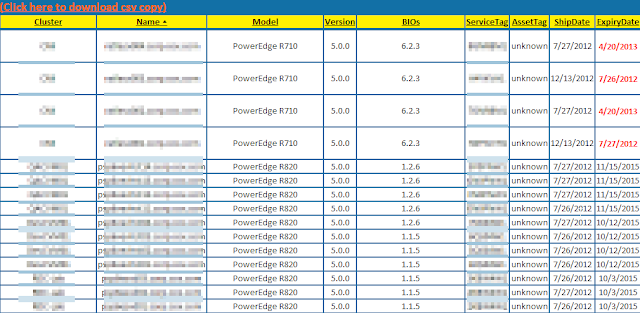
[Update: This code has been updated since it appears the 'OtherIdentifyingInfo' property seems to have problem coming through to vCenter.   Click here to see updated code ] Summary: Needed to get my ESX host warranty info since we haven’t completely deployed our Dell vCenter Plugin .  Here is the code, w/ the Dell Warranty grab code from Marcus Oh .  It’ll get you some additional info too.  You can always edit and remove what you don’t need. Code: $ESXServers = Get-VMHost $ESXServerView = $ESXServers | Get-View $ESXInfo = @()   $oWeb = New-Object System.Net.WebClient   Foreach ($ESX in $ESXServers){ $TargetESXServerView = $ESXServerView | where {$_.MoRef -eq $ESX.Id} $NewObj = "" | Select Cluster, Name, Model, Version, BIOs, ServiceTag, AssetTag, ShipDate, ExpiryDate $NewObj.Cluster = $ESX.Parent.Name $NewObj.Name = $ESX.Name $NewObj.Model = $ESX.Model $NewObj.Version = $ESX.Version $NewObj.BIOs = (($TargetESXServe...

ESX/ESXi Recommended BIOs Settings

Image
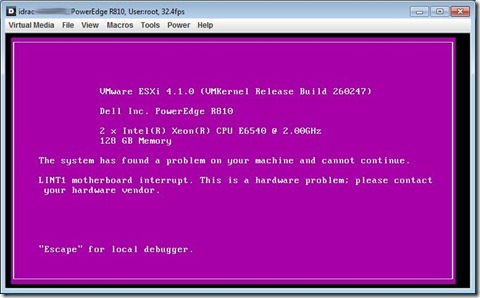
Summary: Came across a PSOD on one my lab manager hosts.  The error read: LINT1 motherboard interrupt.  This is a hardware problem; please contact your hardware vendor Resolution: According to Dell, this occurs because the C1E setting is enabled in the BIOs.  This post helped me from EnterpriseAdmins.org. Finally, it’s mentioned in Page 15 of the vSphere 4.0 Best Practices Guide for recommended hardware BIOs settings.  Guess I need to work w/ Dell to do this for me before sending me an ESX Server.

ESXi 4.x and Dell OMSA

Image
Summary: Read a write up from Alan Renouf on the subject.  Was pretty clear up until the point where it’s mentioned that you must use ‘Dell OpenManage Server Administrator Managed Node’ as a proxy to access a page that you would normally see on a Classic ESX box (https://esxserver:1311).  This is to clarify how that is exactly done. Explanation: Install OMSA on a box, normally vCenter is physical, so that would be your best server. Install  OMSA VIB on ESXi server. Install vSphere CLI or Download/Import vMAAppliance Use vCLI or vMA Appliance to install VIB.  VIB install instructions available on Dell's site along w/ download. Go to your vCenter’s OMSA URL (https://vcenterserver:1311) Click on the link that says “Manage Remote Node” (Version 6.5 pictured below) The screen changes and asks for the ‘remote’ system you want to connect to.