Posts

Licensing in a virtualized world...Somewhat of a pain

Not only do you have to manage your vmware licenses, you have to make sure the VM's you are running are properly covered under an associated OS license.  I haven't really seen an elegant solution to this type of conundrum.  So I needed to create a script to look @ all my ESX hosts and see how many physical sockets they have and to see if there were Windows VM's running on them. This way I could true up which ESX hosts I needed to license Windows Datacenter processor licenses against.  The same type logic could be applied for RHEL licenses.  Anyway, without further ado, here is the snippet I wrote up: $vmhosts = Get-vmhost $LicenseData = @() Foreach ( $vmhost in $vmhosts ) { $NewDataSet = "" | Select Name, NumSockets,Cluster, Windows $NewDataSet .name = $vmhost .name $NewDataSet .numSockets = $vmhost .extensiondata.hardware.cpuinfo.numcpupackages $NewDataSet .Cluster = $vmhost .parent.name $NewDataSet .Windows = If (( $vmhost | Get-VM | w...
Testing Port Connectivity from an ESXi host

Summary: I'm so used to testing connectivity to an ESXi server from a windows or Linux system, that I never thought about how to do it the other way around.  It took me a bit to find it so I figure I should post on this for my reference @ a later date. The key command from the CLI: nc (aka netcat) nc -z DestinationIP DestinationPort -v Example: In my case, I was trying to get Emulex onecommand to download and install firmware to my HBA's.  Emulex onecommand was running on my tools server on ports 8080 and 8443.  To test my connection, I passed the following command: nc -z myToolsServerIP 8080 -v and nc -z myToolsServerIP 8443 -v The commands would just hang, meaning the ports were not responding.  A quick e-mail to my firewall teams and they were able to fix the problem by opening up the ports. VMware KB: 2020669 http://kb.vmware.com/selfservice/microsites/search.do?language=en_US&cmd=displayKC&externalId=2020669

View 5.0 not provisioning

Really short post This can occur when an ESXi host that is not completely configured is introduced to the cluster even when in maintenance mode. i.e. it is still missing an NFS share. Long story short, don't introduce ESXi hosts that haven't been completely configured yet.

vCenter Infrastructure Navigator Removal How to.

Summary: A very cool little appliance that looks @ your VM's and everything they interact with.  Unfortunately, the installation can be fraught w/ issues.  I for one found a bug w/ vCenter 5.0 and VIN 1.1.1 (where VIN 2.0 might have been introduced before).  Specifically, I was unable to apply a VIN 1.0 license to my VIN 1.1.1 installation because I tried to introduce VIN 2.0 first.  Interestingly, my 2.0 key worked fine w/ the 1.1.1 version. Long story short and to make it simple don't introduce VIN 2.0 unless you are on vCenter 5.1. PreReqs for 5.0 users: vCenter 5.0 VIN 1.1.1 vCenter Web Client 5.0 Details: If you have not deployed VIN ever to your 5.0 environment, then I recommend you deploy VIN 1.1.1 and save yourself some headaches.  Otherwise, here are some remediation steps you can take to deploy VIN if you did what I did or set it to auto-upgrade w/o knowing better. Steps to Remove VIN extensions from vCenter Remove VIN...

What does resetting the vCenter Inventory Service database do?

Image
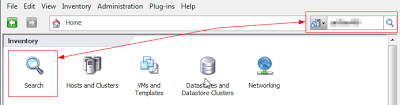
What does resetting the vCenter Inventory Service database mean exactly? [Update: Additional Info added thanks to anonymous feedback] In 5.0 , this simply is the search/index function in the vSphere Client, previously handled by the Tomcat service.  So going through the reset steps outlined here , should cause little to no grief. You could attempt the restore steps, but I don't really see a point in doing so in 5.0 You usually need to go through the reset steps if the client's search begin to slow down and you get "Operation Timed Out Errors" In 5.1 , this database seems to now house the 'tags' info feature. This is where it's now important that you have backups because resetting the database effectively wipes out all your entered 'tags' from existence. Things affected by resetting inventory service database: o vCenter tags (version 5.1+ only) o Storage Profiles o Storage Capabilities o Index of which VMs have which Stora...

Automating Registration of PowerPath Licenses using Powershell/PowerCLI

Summary: EMC documentation is atrocious.  Needless to say, their 'auto-registration' capability is poorly named and represented in my opinion.  It makes you think, deploy a vApp, copy license file, and you're done.  SOOOO NOT the case.  So here is my attempt to hopefully help make the license application portion 'automated' using PowerShell and PowerCLI cmdlets. PreReq: PowerPath 5.8 License vApp PowerPath License File RTools for Windows Details: Deploy the vApp Generate a license file from EMC's website, you'll need the IP and DNS name of the vApp. or contact your EMC support team to have them do it for you. Copy the license file to the vApp's /etc/emc/licenses/ directory Install RTools on a Windows server or your workstation I prefer to have my tools on a shared general purpose system.  This allows me to run scheduled scripts from one location. Copy the same license file to C:\ProgramData\My Documents\emc\PowerPath\rpowermt The...

NAT's + vCenter = BAD

Summary: vCenter was able to connect to and seemingly manage hosts fine, however when a user attempts to clone, an error "Cannot connect to server" is returned.  NAT's are NOT SUPPORTED .   That being said, here is what I did to track down what was causing this issue. Details: First I tailed the vpxa.log while I attempted a clone.  What I found was actually quite interesting.  When attempting the clone, @ some point w/ the destination IP of the ESX host was changed.  It ended up targeting an IP to which I was unaware of what that IP might be. So I performed a traceroute from vCenter to the ESXi host.  It turns out the IP was a firewall in the route. With the firewall IP in hand, I went to the firewall security team and had them check the settings.  Turns out there was a source NAT setup that was causing me the errors.  Once that was removed cloning worked w/ no problems. From my perspective as a VMware admin, I would have had no ide...