Posts

Learning PowerCLI by Robert van den Nieuwendijk

Summary: Don't ask me how to pronounce Robert's last name. Review The great thing about Robert's approach is that he takes the time to point out some basic powershell syntax outside of PowerCLI. You are then soon driven into some very useful cmdlets to extract information from your vSphere environment using Powershell and vSphere's PowerCLI cmdlets. There were a couple of areas of concern where a lack of explanation on certain things lead to a hmmm? moment, but overall an excellent book for a vSphere admin looking to use PowerCLI. For me as a technical person, I like the 'straight to the point' approach. This book is filled w/ little text and more usable script examples for me to get my job done as an admin/engineer. Disclosure For full disclosure, I was given this book to review, but was not compensated beyond this. I also have met Robert before, but that in no way has an affect on my review of this book. The above review reflects my honest opinion. You can...

The server naming convention is dead, long live the server naming convention!

Summary: Get rid of conventions that can be cross-referenced from other data sources in a programmatic fashion.   Consolidate or present those cross-referenced data points into one pane of glass. Rant: In times old, server's had cool names like Ferrari, Robotech, etc.  Although cool, this drove the need for a server naming convention which served useful purpose.  It could tell us a good many things about a server just by looking @ its name.  Some things could be: Location OS Application Etc. Because of limitations in previous technologies, you had to limit your server name to a certain number of characters (coming from a Windows background).  Each of these data points needed to be shortened to acronyms or numbers.  This essentially requires a decoder ring for each section of the server name to understand it's hidden meaning.  When dealing w/ a small environment, not a big deal, but scalability becomes a problem. Using the exa...

Quirkiness of Excel 2011 for Mac, CSV's, and Powershell 3.0 import-csv

Image
Summary: Work on Windows or a Mac, don't cross the streams unless you're up against Gozer. Details: I made a CSV file using Excel 2011 for Mac w/ that looked something like this: HeaderName, HeaderName2, HeaderName3, HeaderName4 Meh, super.meh.local, space, heckling Sigh, super.meh.local, space, bashing Saving this as a "Comma Separated Values" file was my first mistake cause when I tried to import this in Powershell, I would get the following super helpful error: import-csv : The member "super.meh.local" is already present To boil it down, I needed to save the CSV as a "Windows Comma Separated" csv file type.  The other method was that I could have placed quotes around all comma separated values via a text editor.

vCenter Log Insight not receiving syslogs from ESXi hosts

Summary: This appears to occur under very specific circumstances. There is a KB and it is also noted Log Insight's troubleshooting section of their documentation. Rather than regurgitate all the same information is here is the gist: Occurs when log insight services are restarted Affects ESXi 5.0.x/5.1.x when using TCP and 5.0 U1 and earlier over UDP. Does not affect 5.0 U2 and newer when using UDP. Here is the table: Communication Protocol Affected ESXi Version TCP ESXi 5.0.x ESXi 5.1.x UDP ESXi 5.0 and 5.0 U1

Get Dell ESX host warranty info via PowerCLI version 3

Image
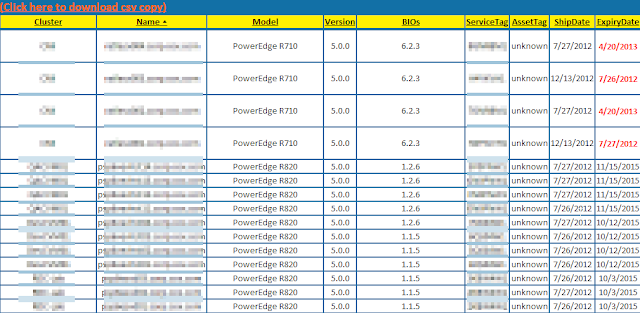
Summary: Had a script that was doing a screen scrape of Dell's support page for warranty info.  Now they require a log in.  So it was time to finally revise my script to use Dell's wsdl (SOAP) interface. Example: Details: I was able to simplify the script a bit using the code provided by Jon Gurgul to pull from Dell's provided SOAP service.  I copied the code into a Get-DellAssetInformation.psm1 file so I could call the function as a module. The variable you should probably update is the $ServiceDescription variable to match the warranty type you expect from your boxes so you get an actual return of data. I simply plugged this into my existing code removing the screen scrape code and this is what I ended up with: Script: Add-PSsnapin VMware.VimAutomation.Core #Module code courtesy of Jon Gurgul Import-Module C:\myModuleDirectory\Get-DellAssetInformation.psm1 $VIServer = Connect-VIServer myvCenterServer $date = Get-Date $htmpath ...

Auto-Remediation vCenter Alarm

Image
Summary: I've been dealing w/ issues on Emulex OCe11102-FM logging out of the vSAN Fabric and not recovering. Long story short, it's been a firmware problem and I was able to get a alpha firmware that fixed the issue. In the meantime, I had created a PowerCLI script to auto-remediate every hour if a degraded path was detected.  I wasn't fond of the solution, so I looked to vCenter alarms to see if I could have them do it for me.  Turns out they can, but there are caveats to this approach. What follows is an example of how to set something like this up and details specific to the errors/configuration I was dealing with.

SOAP(y) Powershell fun w/ BT Diamond's IPAM (Part 2)

Image
Since my initial attempt using New-WebServiceProxy failed because it didn't like the XML return from IPControl, I needed to find out why.  This is where I downloaded SOAPUI to dig in and find out why.  More importantly, I found that I could use the info from it to plug into the Invoke-WebRequest cmdlet. [I'm going to be using Dell's web service as an example simply because it's easier from an example standpoint.  Dell's service actually works w/ the New-WebServiceProxy cmdlet.  The basic concept of what I'm doing is the exact same though.]