Posts

NSX-T: Clear NSX-T DNS Forwarder Cache
Image
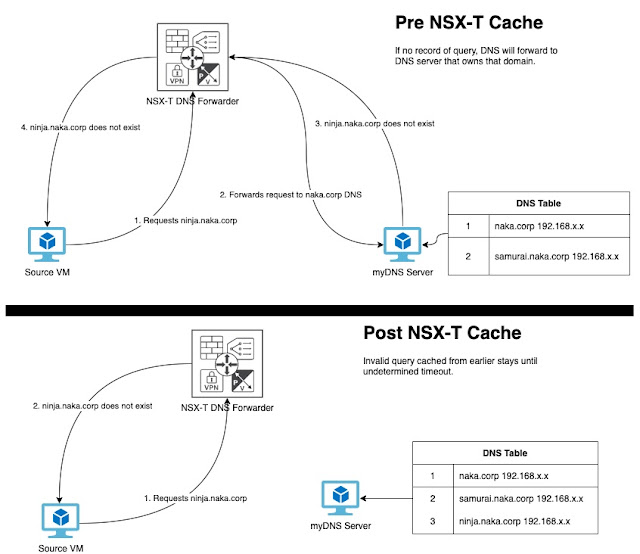
[ Update: NSX-T ingests negative SOA TTL from myDNS server in this example.  Microsoft DNS defaults this to 1 hour.  So NSX-T will cache the negative result for an hour. To combat this behavior, you can set your source DNS server to a lower TTL so that cache in NSX-T clear quicker.  Valid records in this setup will still cache for 1 hour or whatever you have your DNS server set to.] To determine TTL value for the negative record: nslookup -type=a -nosearch -d2 brokenaka.ninja.corp Summary: Ran into an interesting behavior w/ NSX-T's DNS forwarder service.  Basically, if I queried for an invalid DNS name, NSX-T's DNS caching appears to capture that invalid query for an undetermined amount of time. So what does this do?  Basically, if I queried for ninja.naka.corp w/o creating the entry on my DNS server, NSX-T caches that invalid record.  If I then registered ninja.naka.corp on my DNS server, NSX-T will continue to tell me that the record is invalid even thou...

Powershell: Azure submitting JIT Request via Powershell

Image
Summary: If you make use of Azure Security Center w/ your VM's, you can enable Just in Time VM Access (JIT) .  This allows you to open up ports for a finite period of time to access your VM via its public IP.  I make use of this a lot working in my environments to sshuttle in.  Connection will stay active as long as I maintain it, otherwise I get disconnected and have to go through JIT process again. Anyway, going through the portal can get very cumbersome requesting this access, so you can use the below powershell example to automate opening ports, setting time frame, and setting an allowed public IP address source.

PowerCLI: Getting HCL DID, VID, and SVID information.

Image
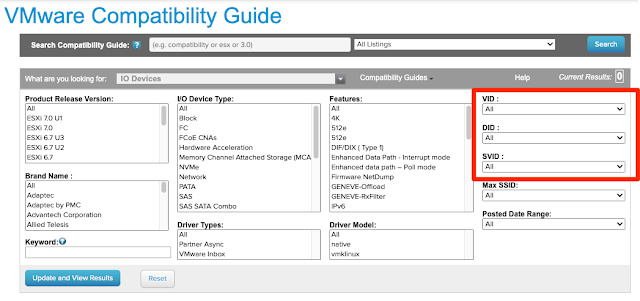
Summary: Searching for IO devices on VMware's HCL list  is easier, if you have data like DID, VID, and SVID.  Thought I posted on this awhile back, but apparently forgot to do so.  Below is a script that you can run on an ESXi host to get those values needed for the PCI devices you are trying to look up.

Misc: Technology industry new terminology initiative

Image
Summary: I've been working in technology for about 20+ years now, so it'll be difficult for me to break old habits w/ terminology, but I'm posting this here in the hopes that I can continue to adjust to new dynamics. Nothing really technical here, but if you happen to commit/modify code anywhere, here is a good starting point to adjust the terms you use in your code.  Also, a reference point to adjust your spoken vernacular to be inclusive to all those around you. Information shared from the VMware vExpert program . Words Recommended Alternate Other Situational Alternates if Recommended Alternate does not work abort stop ·           cancel ·           halt prematurely ·           end prematurely ·           stop prematurely blacklist ·           denylist (n) · ...

Powershell: Changing NSX-T Segment Profiles enmasse.

Image
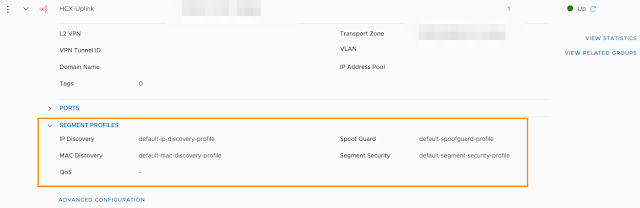
Summary: Note to self, cut back on the reddit .  It's a time suck and VMware questions are popping up that I have time to answer w/o the shadow of a retired LucD bot lurking.  Anyway, someone asked if you could update segment profiles, so I got curious and followed the rabbit. Here is the example I came up with.  It's straight powershell core, so no special modules needed, not even vmware.powercli.  GASP!

Powershell: Clearing a bad route advertisement rule from NSX-T logical router/gateway created via policy API.

Image
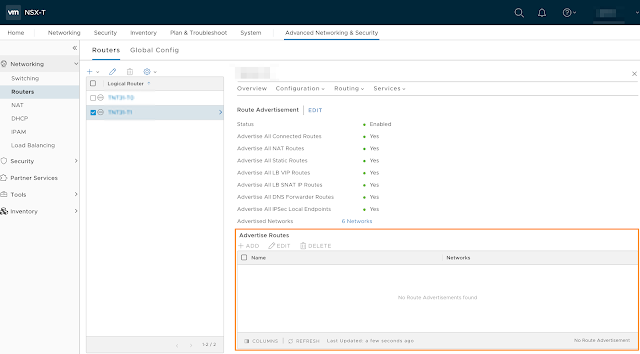
Summary: Basically ran into a weird issue where a T1 was not advertising a very specific subnet when configured on segment.  Come to find out when looking at the advanced networking section of that T1, there was a route advertisement rule that denied that subnet from being advertised up.  Since the T1 was created via the policy API, you cannot simply delete it via UI. Have no idea how that route advertisement rule even got there, but something tells me a bug exists.  Unfortunately have no idea how to reproduce it. [ Update: I have a hypothesis on how it got there now.  When you instantiate a DHCP server via the policy engine, whatever network you place on and attach to a T1 shows up here.  This is likely why the network was here.  What seems to have happened is that deletion of the DHCP server did not happen cleanly and left that artifact there. ] Workaround: Long story short, you have to call the API to do so.  Here is a powershell snippet t...

PowerCLI: New-HCXMobilityGroup - A parameter cannot be found that matches parameter name 'source'

Summary: Running the above cmdlet and passing what is apparently the only required parameter of name, results in the above obscure error. It refers to a parameter that doesn't appear to exist for the cmdlet.  There is also the -migration parameter that looks for a <HCXMobilityGroupMigration[]> object array that no other HCX cmdlet provides. Long story short, informed VMware, they are going to fix the cmdlets and their documentation.  In the meantime, here are some examples that VMware's GSS shared to be able to use the New-HCXMobilityGroup cmdlet. Here is the code: