Posts

Gather disk.usage.average stats per Datastore

Image
Image via Wikipedia Summary: This script isn't perfect as there can be some exceptions to the rule, but it can give you an idea of how much you are utilizing to each of your datastores to determine if there might be a bottleneck. Get-DatastoreAvgUsgKBps.ps1 Details: The script first gathers your datastores, then does a get-vm to list all VM's located in that datastore. For each VM, get-stat is run to gather the disk.usage.average metric for the date range specified in the $start and $finish variables. Once that data is gathered for that VM, it takes the KBps data and mathematically averages those numbers then continues to the next VM in that Datastore. After averages for all VM's in the datastore have been calculated, they are all added up to represent the Average disk usage KBps against that datastore. This is repeated for each datastore. Exceptions: If a system has been vmotion'd to another datastore within the specified date range, the averages could be thrown off. S...
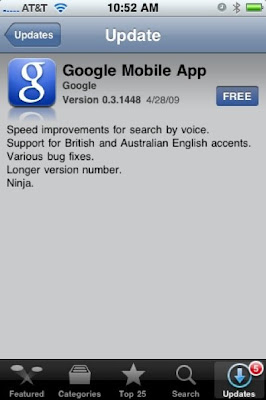
iPhone Google App now includes Ninjas!

Image
The iPhone Google App now includes Ninjas....freakin sweet! LOL

Convertto-html, firefox, chrome, CSS rendering problem

Image
Summary: To prevent whitespace and/or bloat in your html file use the " -encoding ASCII " switch for the " out-file " cmdlet. Problem Statement: I've finally gotten a script to pull a bunch of information then convert it into a fairly clean looking html page. It renders perfectly hosted on IIS with an IE browser pulling CSS and JS for readability and sort capability. The problem is that firefox, chrome, and safari doesn't render the CSS style and JS. Here is the kicker. It's not that the html code, CSS, or JS are bad, but that the html file seems to be bloated w/ white space. So, powershell generates the html code that should be only equal to 3KB, but the file ends up being double that @ 6KB. So you can literally copy and paste the code into a blank txt doc, convert it to htm, then low and behold, it renders just the same in all browsers. I'm working to figure out how I can clean up this whitespace. So far, just grabbing the file info, w/ th...

New Powershell VMWare Summary Report Script using functions

Image
UPDATED and Optimized Script can be found HERE. I'm hoping this is easier to read for any interested. Things I track in this script are as follows: Cluster Name # of Effective Cluster Hosts # of VM's in the cluster # of allocated vCPU's VMWare supported maximum of vCPU's per core Datastore full size Datastore free space Datastore used space as a percentage Above is an example pic of what the script generates and how it should look. The script is posted here . I suggest copying and pasting into a Powershell editor like PowerGUI or Powershell PLUS for readability. It automatically generates an html and stylesheet file and places them on your C drive. You can change a bunch of variables that are commented toward the top of the script. Hope you can find this useful. [Update: I've added sort capability to the code via a Javascript library which can be downloaded here . ]

Powershell html formatting using convertto-html cmdlet

This was took me a little bit to figure out, but I finally did. Wasn't able to find this solution on the web so I figure I would post what I had to do to make it work. I basically had a 'if else' statement that I wanted the return of an if statement to highlight in red and be bolded in html. Unfortunately, the convertto-html cmdlet converts ' ' to html friendly formats for display like '<'and '>'. So here is the key: ...code... Convertto-Html foreach {$_.replace("<"," ")} Afterwards, you can pipe to a file where the formatting you placed in your code stays intact.

VI3 Statistics Script

Summary: The script does the following: Grabs Number of Hosts per Cluster Grabs Number of VM's per Cluster Determine maximum number of VM's per cluster based on your determined ratio Current capacity % based on your defined max Total SAN/Datastore space per cluster Total SAN/Datastore space per cluster currently in use Total SAN/Datastore per cluster Free space. SAN/Datastore space currently in use per cluster in percent. I'm still getting my feet wet w/ this Powershell thing, but I feel I'm slowly getting the hang of it. As one of my first fully written from scratch scripts, I'm kinda proud. It's an ugly beast that could probably written a lot cleaner, but it's my ugly beast. You'll probably want to copy and paste into PowerGUI for readability. http://docs.google.com/Doc?id=ddvthst9_11spnzs8fm

Windows 7 Beta

Image
Jumping back and forth between Mac (home) and Windows/VMWare (work) has been fun for the past 2 years. If I had my choice, I'd probably dump Windows at work to exclusively use Mac. Although, I'd been reading that the new Windows 7 addresses alot of gripes people had w/ Windows Vista (I use Vista 64-bit and XP at work). So I've downloaded the Beta and installed on one of my extra laptops. Laptop Specs: Intel Core Duo T2050 1.6GHz 1024MB RAM Intel Mobile 945 Graphics Not the greatest specs in the world, but good enough to trial Windows 7. Install was pretty straight forward, just like Vista. Once I booted into the OS, it was fast and zippy, more so than my Vista box when I first built it. The new windows explorer bar acts much like the Mac dock in that you can 'pin' your applications to it and when run it simply 'highlights' much like the Mac's 'dot'. The one up that Windows 7 has vs. Mac is that it stacks multiple instances in that one '...