Posts

Replace SSL Cert Emulex OCM for VMware with a signed one.

SSL Certs are something of an enigma that have always eluded my proper understanding.  So I took it upon myself to figure this one out. Summary: Replace default OCM cert w/ one that is CA signed.  Click below to continue.

vCenter Operations 5.x vApp LDAP Configuration

Image
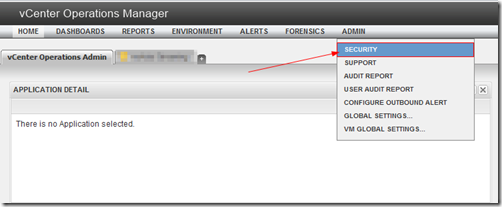
Summary: I happened to see someone searching for this and coming across my previous post on it’s wonkiness , so I figured I’d make a post showing how I went about configuring it w/ an Active Directory domain.  This only applies to the vcops-custom page.  The standard vCops-vsphere page uses vCenter’s authentication via role permissions. Details: Log into your vcops-custom page as an admin. (example http://yourvCOPsUIvmIP/vcops-custom ) Select Admin –> Security Select the Import from LDAP button Select the add button Now see the screenshot below to see how to fill out the configuration screen: Below details how the auto-sync works: You’re pretty much done @ this point. Auto Sync occurs once every hour, so once you configure it, it’ll take approx. an hour before users are granted access.  The other caveat is that nested groups are not supported.  Users must be direct members of the security group you setup w/ Auto Sync. Feel free to ask q...

Symantec and vExpert event

Many moons ago back in April, I and several other vExperts were invited to Symantec HQ for an executive briefing.  What I thought was just going to be a sales pitch, turned into a deep discussion around virtualization philosophy and technical discussion around Symantec’s many products.  Hit the link to read more if you are interested in my experience.

Uninstall HA agent manually

This is something you’ll likely have to do on a rare occasion.  In case you do though, here is the info need to do so. Disable HA on cluster. SSH into ESX/ESXi box Run the following: # Stops management services /sbin/services.sh stop # Runs uninstaller script /opt/vmware/uninstallers/VMware-aam-ha-uninstall.sh # Sometimes has problems removing the below directory, so we help it. rm -rf /opt/vmware/aam # Restarts management services /sbin/services.sh start

RSA and VMware View iPad App

Image
One of the nifty things about the current VMware View iPad App is it's ability to import a RSA token.  Unfortunately, the documentation on how to do this is a bit scarce.  These steps may work for Android too, but I don't have an Android tablet to test with. PreReqs: RSA Server 7.1 SP4 <-- This is what I tested against. View 4.5+ w/ RSA enabled. VMware View iPad application Simply go to your RSA self-service page and request a new token.  If it's enabled you should have an option like this: You'll want to select "I need a specific software token" then select "RSA SecurID Token for iPhone and iPAD/iPOD" Once you or your RSA admin approve your request, you should get a link and activation code that looks something like this: Joe, your new or additional software token request has been approved with the following comments from your administrator: RSAAdmin: approved Please ensure that the RSA SecurID application is installed on...
vExpert Gift!

Image
Pretty sweet gift from @VMWare .

vCOps Enterprise 5 vApp LDAP bug? (One or more users already exist and haven’t been imported)

Image
Summary: I had been having issues w/ our deployment of the  vCenter Operations vApp.  The Web GUI interface has two pages, https://vCopsServerName/vcops-vsphere and https://vCopsServerName/vcops-custom .  It seems vcops-vsphere simply uses vCenter privileges to determine whether you can login and what you can view.  vcops-custom however does not and has a separate set of permissions it uses to determine a user’s access authority.  They both however utilize the same useraccount table in the postgres database. Workaround: This KB contains the steps needed to workaround the LDAP import problem: http://kb.vmware.com/selfservice/microsites/search.do?language=en_US&cmd=displayKC&externalId=2013440 Step 2 was incorrect as of this post date, it should read as follows: # su postgres # psql -d alivevm I’ve let VMWare and @VMWareKB know of the typo.  So it should get corrected. Details: I found that when I login into vcops-vsphere, it uses my permissi...