Posts

vExpert 2011

I'm happy to announce that I've been recognized as a VMWare vExpert for 2011.  I appreciate the community's support and hope I can continue meet/exceed everyone's expectations.  Thanks! \(^o^)/

Netbackup Perms and vSphere 4.x

Summary: Symantec has posted the specific rights needed for backup and restoration of VM's in vSphere.  It is very helpful if you do not want to grant blanket administrator rights to the service account used. Link: http://www.symantec.com/business/support/index?page=content&id=TECH130493 My previous post around this subject is a bit more detailed on which nodes in vCenter you'll want to apply this role.

Updated Permission Set for View 4.x Composer Role

Summary: This did not come to my attention until I found a use case for ‘local mode’ vm’s.  The following table contains updated permission sets for View 4.x when using local mode and the new Transfer server.  This is an update to my previous entry . Details: Privilege Group Privilege(s) to Enable Folder Create Folder   Delete Folder Datastore Browse Datastore   Allocate Space   Low Level file operations Virtual Machine Inventory (All Rights)   Configuration (All Rights)   Interaction > Power On   Interaction > Power Off   Interaction > Suspend   Interaction > Reset   State   Provisioning > Clone VM Provisioning > Clone Template Provisioning > Allow Disk Access   Provisioning > Deploy Template   Provisioning > Read Customization Specifications Resource Assign Virtual Machine to Resource Pool Global Enable Methods   Disable Methods   System Tag NOT in the inst...

System Center CodeName: Concero, a vCloud Director MS Version

Looks interesting especially that it also ties into Microsoft's Azure product as well.  Definitely something to be watching.  Will end up being a part of the System Center Suite License.  You can find more information here: http://blogs.technet.com/b/systemcenter/archive/2011/03/25/announcing-system-center-project-codename-concero.aspx vCloud Info here

Hypothetical Cloud-Based ThinApp w/ View

Summary: The great thing about View is it’s simplicity.  Add into ThinApp, and you’ve got something awesome.  How do I setup ThinApp delivery and provide application level data persistence w/ geologically dispersed View hosted datacenters.  Easy. Requirements: View 4.5+ ThinApp 4.5+ Some kind of DFS Some kind of NAS that does de-duplication. Active Directory Details: Capture your ThinApp Generate a MSI (streaming would be preferred) Sandbox Location should point to your DFS share (which is hopefully on a deduplicated lun/nas) Path should be something like this: \\somedfsshare.local\%USERNAME%\ This will create a unique sandbox per user and persist their application information even on a non-persistent desktop. Project Location is up to you, but I would generally also place this in a DFS share so updates can be replicated easily. Once you’ve done this, you’ve essentially created a ‘cloud’ ready ThinApp that your VDI/View users can use no matter what View in...

ESXi 4.x and Dell OMSA

Image
Summary: Read a write up from Alan Renouf on the subject.  Was pretty clear up until the point where it’s mentioned that you must use ‘Dell OpenManage Server Administrator Managed Node’ as a proxy to access a page that you would normally see on a Classic ESX box (https://esxserver:1311).  This is to clarify how that is exactly done. Explanation: Install OMSA on a box, normally vCenter is physical, so that would be your best server. Install  OMSA VIB on ESXi server. Install vSphere CLI or Download/Import vMAAppliance Use vCLI or vMA Appliance to install VIB.  VIB install instructions available on Dell's site along w/ download. Go to your vCenter’s OMSA URL (https://vcenterserver:1311) Click on the link that says “Manage Remote Node” (Version 6.5 pictured below) The screen changes and asks for the ‘remote’ system you want to connect to.

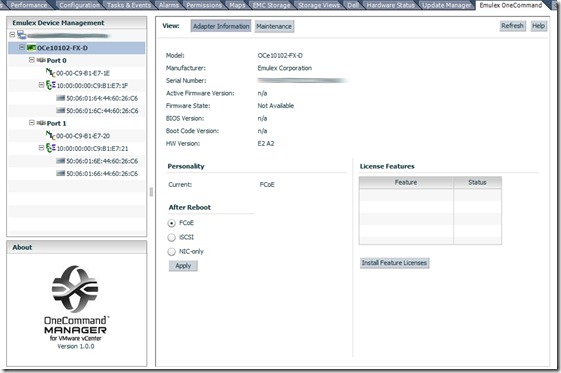
Emulex OneCommand Plugin for vCenter

Image
Summary: This plug in adds an extra tab to vCenter that lets you manage your Emulex HBA/UCNA’s.  From setting drivers parameters to allowing you to apply firmware updates to your HBA/UCNA card.  To do so, you must install the CIM package onto your host and have a server for the Emulex OneCommand Software Plug-in. PreReqs: Windows Server VM(suggest 2008 x64 R1 or R2) Software Plug-in CIM Provider 3.2.x + vSphere CLI or vMA <— Needed to remotely install CIM provider bundle vCenter 4.1+ Details: You can install the Emulex Software Plug-in on the vCenter server, but I suggest keeping all modules separate from vCenter if possible. Run the Software Plug-in installation. Install the CIM Provider on all hosts you would like to have onecommand management capabilities. Place ESXi server in maintenance mode. vCLI command is as follows: vihostupdate.pl --server nameofyouresxserver --install --bundle \\path\to\elx-esx4.1.0-emulex-cim-provider-3.2.30.1-offline_bundle-...