Posts

Showing posts with the label View

vSAN Cost-Effective Architecture (For Desktops, almost there for servers)

Image
So my esteemed colleague, Andrew Harding , brought this to my attention and the idea has kind of blossomed.  I thought it was rather clever approach to implementing VSAN in a cost effective manner. The current line of thinking w/ VSAN is that you buy each host w/ the exact same disk configuration. In this way, with each host purchase, you not only get capacity, but you get additional I/O and CPU/Memory performance. Disclaimer: Mac Mini's are completely unsupported by VMware, this is for illustration purposes only. There are a couple problems w/ this model: Additional vSphere license cost Additional VSAN license cost Additional Hardware SSD/Disk cost Being that VSAN does NOT attempt to keep VM storage data local to a host, you can augment your VSAN cluster w/ simple compute hosts that have no storage.  Meaning, if you don't have storage capacity or I/O performance problems, you can simply add another host that does not participate in the VSAN for additional C...

View 5.0 not provisioning

Really short post This can occur when an ESXi host that is not completely configured is introduced to the cluster even when in maintenance mode. i.e. it is still missing an NFS share. Long story short, don't introduce ESXi hosts that haven't been completely configured yet.

RSA and VMware View iPad App

Image
One of the nifty things about the current VMware View iPad App is it's ability to import a RSA token.  Unfortunately, the documentation on how to do this is a bit scarce.  These steps may work for Android too, but I don't have an Android tablet to test with. PreReqs: RSA Server 7.1 SP4 <-- This is what I tested against. View 4.5+ w/ RSA enabled. VMware View iPad application Simply go to your RSA self-service page and request a new token.  If it's enabled you should have an option like this: You'll want to select "I need a specific software token" then select "RSA SecurID Token for iPhone and iPAD/iPOD" Once you or your RSA admin approve your request, you should get a link and activation code that looks something like this: Joe, your new or additional software token request has been approved with the following comments from your administrator: RSAAdmin: approved Please ensure that the RSA SecurID application is installed on...

VMWare View Powershell useful cmdlet notes.

Summary: I’m just staring to put this together mainly for my own benefit, but if someone else finds this useful, then great.  I’ll be continually adding to this post.  If you’d like to contribute or if I got something wrong please feel free to leave a comment. Notes: Disable Provisioning in all linked clone pools: $pools = get-pool $pools | Update-AutomaticLinkedClonePool -isProvisioningEnabled:$false Gets list of all View related cmdlets: get-command | where {$_.modulename -match 'vmware.view' } #Below is so you can include it into the #add-pssnapin.ps1 under your View installation directory function get-viewcommand {get-command | where {$_.modulename -match 'vmware.view' }} Gets list of pools, max number of VM's, and datastores associated: #Helps in making sure your pools are distributed across evenly among datastores. Get-Pool | Select Pool_ID, MaximumCount, DatastorePaths

VMWare View 4.x/5.x (missing) entries

Summary: Stale entries in VMWare View show desktops in any of following status: Provisioning Error (Missing) Deleting (Missing) Resolution: If remove from the view admin console does not clear out the above entries within 30 min. – 1 hour, the steps in this KB from VMWare can assist in clearing out the those stale entries. http://kb.vmware.com/selfservice/microsites/search.do?language=en_US&cmd=displayKC&externalId=1008658

Updated Permission Set for View 4.x Composer Role

Summary: This did not come to my attention until I found a use case for ‘local mode’ vm’s.  The following table contains updated permission sets for View 4.x when using local mode and the new Transfer server.  This is an update to my previous entry . Details: Privilege Group Privilege(s) to Enable Folder Create Folder   Delete Folder Datastore Browse Datastore   Allocate Space   Low Level file operations Virtual Machine Inventory (All Rights)   Configuration (All Rights)   Interaction > Power On   Interaction > Power Off   Interaction > Suspend   Interaction > Reset   State   Provisioning > Clone VM Provisioning > Clone Template Provisioning > Allow Disk Access   Provisioning > Deploy Template   Provisioning > Read Customization Specifications Resource Assign Virtual Machine to Resource Pool Global Enable Methods   Disable Methods   System Tag NOT in the inst...

Hypothetical Cloud-Based ThinApp w/ View

Summary: The great thing about View is it’s simplicity.  Add into ThinApp, and you’ve got something awesome.  How do I setup ThinApp delivery and provide application level data persistence w/ geologically dispersed View hosted datacenters.  Easy. Requirements: View 4.5+ ThinApp 4.5+ Some kind of DFS Some kind of NAS that does de-duplication. Active Directory Details: Capture your ThinApp Generate a MSI (streaming would be preferred) Sandbox Location should point to your DFS share (which is hopefully on a deduplicated lun/nas) Path should be something like this: \\somedfsshare.local\%USERNAME%\ This will create a unique sandbox per user and persist their application information even on a non-persistent desktop. Project Location is up to you, but I would generally also place this in a DFS share so updates can be replicated easily. Once you’ve done this, you’ve essentially created a ‘cloud’ ready ThinApp that your VDI/View users can use no matter what View in...

VMWare View for iPad “Desktop loading warning - Your desktop is loading too slowly.”

Summary: When attempting to connect to a VMWare View 4.5 environment via a Security server the following error is generated: Desktop loading warning - Your Desktop is loading too slowly, please check your network VMWare View for iPad is technically made for View 4.6, however, it will work w/ a 4.5 environment, just not connecting through a 4.5 security server.  So it’s a half-truth. WorkAround: Utilize VPN on your iPad.  You can configure VPN via the Enterprise Tool provided by Apple free of charge. iPhone Configuration Utility for Mac iPhone Configuration Utility for PC Connect to a 4.5 Connection Server (not a 4.5 security server) This can normally be achieved through step 1 or via your internal wireless network. Resolution: Upgrade to View 4.6.  Easy if you are running Windows 2008 R2. Why 2008 R2?  This is the only to get PCoIP support through the security server.  A bit more complicated if you find yourself needing to upgrade the OS on...

View 4.5 New VM's not being composed.

Summary: VM's stopped composing and the following messages appears in View logs: VC_DISABLED:VC:cn=04683182-25c0-40f7-b9a1-1963167d877a,ou=virtualcenter,ou=properties,dc=vdi,dc=vmware,dc=int;REASON:VM operation failed: com.vmware.vdi.svisupport.SVIException: View Composer Fault: VMware.Sim.Fault.VcDatastoreInaccessibleFault; Desktop Composer Error:VMware.Sim.Fault.VcDatastoreInaccessibleFault; Error Type:com.vmware.SviService.VcDatastoreInaccessibleFault;Error FaultActor:null; Error code:{http://schemas.xmlsoap.org/soap/envelope/}Client; Error details:[Lorg.w3c.dom.Element;@b729f8 This seems to occur if an ESX host is added to the View Cluster that has not been mapped to the View shared disks.  Placing the host in maintenance or disconnecting doesn't seem to help. Workarounds: Remove the ESX host until all shared disks have been mapped. Move ESX host to temporary folder/cluster/node until host is configured properly.

VMWare View New Client Builds for Windows 7 with KB2482017 or 2467023

Summary: Microsoft released two patches that seemed to break the View 4.5 Client on Windows 7.  VMWare has since then released new client builds.  The problem is that they provide these as separate downloads and not through an update to the connection servers. Workaround: Download the updated clients from VMWare . Go to your connection server installation directory and navigate to the downloads.war directory. (Default: C:\Program Files\VMWare\VMWare View\Server\broker\webapps\downloads.war) Rename the VMWare-viewclient.exe and VMWare-viewclientx86_64.exe files. (I appended –build293049) This is in case you need the older builds. Now copy the updated client install versions into the directory and rename each respectively to the same file names referenced in step 3. Now any new/current user can get the new updated client w/o going somewhere else.  The newer client was only tested w/ Windows 7, but I did not see any issues using the client on Windows XP Pro 32-bit....

VMWare View 4.5 and Citrix NetScalers Persistence Type

Summary: It was rather difficult to find information on how to setup a Netscaler w/ VMWare View.  So here are my settings.  VMWare posted a KB because wrong settings causes issues. Resolution: You should choose Persistence Type: Source IP. I did a timeout value of 2 min , but to each his own.

View Composer not deleting or spinning up VM’s…

Summary: When deleting VM’s from inventory, View Composer usually starts the job in vCenter within a few minutes.  In this case, it was not and restarting the View Composer service on vCenter didn’t fix it. Config: vCenter 4.1 View 4.5 Resolution: In this particular case, one of my View Connection Broker Replica servers had shutdown and the following logs were seen on my primary connection broker: Event Type:    Information Event Source:    VMware View Event Category:    VMware View Event ID:    102 Date:        10/25/2010 Time:        11:24:51 AM User:        NT AUTHORITY\SYSTEM Computer:    Primary Broker Name Description: The failed LDAP replication attempt to Secondary-Replica Broker Name can be caused by a firewall blocking communication between this server and Secondary-Replica Broker Name o...

Provisioning error occurred for Machine vmname01: View Composer agent initialization failed.

This error may also appear in View’s Event Log: “View Composer agent initialization state error (6): Unknown failure (waited 0 seconds)” View 4.5 Agent apparently still has an issues with the App-V agent or vice versa.  The “Application Virtualization Client” (sftlist) should be disabled or placed into manual mode on your Parent VM.  Rest of instructions on how to combat this can be found here: http://tech.zsoldier.com/2010/03/view-composer-agent-initialization.html

View 4.5 Post-Synchronization Script not running?

Image
Summary: I have a post synchronization and power-off script that clears some McAfee reg keys, starts App-V services, and other misc. stuff (workaround from 4.0.1) that I’ve ported over to 4.5.  Essentially, I noticed when logging into my View 4.5 systems, this script was not being run for some reason.  Below is what I was seeing in my View pool settings: Notice the Yen symbols?  This likely happened when I recreated these pools and I was typing in “Romaji” instead of “US” on my Mac.  The Yen symbol is the equivalent of backslash(‘\’) on the keyboard and translates fine for most applications, not for View 4.5 apparently though.  This is likely a rare occurrence in which my Japa-cheesyness isn’t so cool. Resolution: Replace the Yen symbol w/ a good ‘ol US backslash(‘\’) as picture below: The good news is that after making this change any new VM’s that spin-up will run the batch files correctly.

VMWare View 4.0.1 no desktop resources exist, but admin console shows VM’s in Ready status…

Summary: Essentially the title sums it up.  A user tries to connect to a pool, but they get an error stating that no desktop resources are available to them.  A look @ the admin console shows either the VM is in “Ready” or “Disconnected” status. Possible Resolutions: Reset the “VMWare View Agent” service on all or a specific VM in a pool. Reset the VM from the vCenter management console. Check your DHCP pools, make sure all addresses are not reserved already. I believe the View admin console lacks the code to display something like ‘offline’ when it loses communication w/ a VM’s View Agent.  It’s interesting because the View broker is aware that a VM’s View Agent is offline based on it’s debug logs (Usually found under C:\Documents and Settings\All Users\Application Data\VMWare\VDM\logs), but you would never be the wiser because the admin console shows everything to be fine.  It seems that status is only updated when it ‘expects’ something back from the Agent ...

VMWare View (Desktop Composer Fault: Virtual Machine with input specifications already exists)

Summary This error is caused when View Composer has some kind of hiccup and ‘thinks’ it deployed a desktop and can’t get over the fact that it failed.  There are 3 event entries that will usually show up right next to each other: Desktop Composer Error:VMware.Sim.Fault.InvalidParameterFaultParam: cSpec Detail: AlreadyExist; Error Type:com.vmware.SviService.InvalidParameterFau Desktop Composer Fault: Virtual Machine with input specifications already exists PendingOperation-Path/that/has/been/defined/ VMName Config: View 4.0.1 SQL 2005 Resolution: I found this SQL script on the vmware communities board after I went through the manual hell of finding each related key.  Essentially, you need to delete all related SQL entries so View Composer can move on to start deploying VM’s again.  This script makes this job a WHOLE lot easier. 1: DECLARE @vmdelete varchar (20); 2: set @vmdelete = 'FAILED_VM_NAME' ; 3: delete from SVI_VM_NAME where NAME = @v...

View Composer agent initialization state error (6): Unknown failure (waited 0 seconds)

Image
Perhaps the most useless error message on the planet, right next to PC Load Letter. [UPDATE: The workaround detailed below refers to quickprep only.  Versions 4.5 and above now allow you to use customization specifications in vCenter.  I'd recommend using those for easier administration, especially when expanding your environment.] Summary: This error message can appear when deploying View Pool from a Parent VM (aka Gold Image) that has Microsoft’s App-V 4.5 client installed: View Composer agent initialization state error (6): Unknown failure (waited 0 seconds) Workaround: On the Parent VM, change the “Application Virtualization Client” service to manual. Next steps are completely voluntary.  The only reason I went further was so that as soon as a user logs into a View session, their App-V applications would show up immediately. Create a batch/cmd file and place it on the root directory of the VM. (Commonly C:\) Open Notepad Paste the following...

vCenter Permissions/Roles overkill? maybe? maybe not… specifically with View 4.0.1

Image
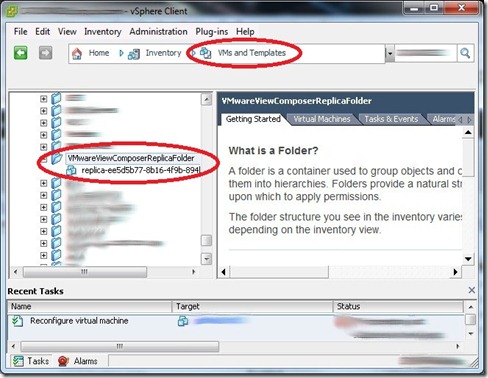
Related Products: VMWare View 4.0.1 VMWare vCenter 4.0 U1 Problem Statement: When creating a View Desktop Pool, no folder path, or datastores are presented and a whole other slew of errors should you decide NOT to grant the administrator role to the View Composer Service Account . Resolution: View Composer Role permissions need to be granted in 1 or 6 places in vCenter depending on how restricted the account should be.  1 place would be to grant the administrator role to the View Composer Service Account @ the vCenter Node Level and propagate down.  If the aim to to restrict access to one cluster/host, then the View Composer Role must be applied to the following areas: Pictures are provided as an example and are not a reflection of how all vCenter servers are configured/designed. VM and Templates – Role added to Chosen Target Folder, Gold Image Folder, and the “ VMWareViewComposerReplicaFolder ” Hosts and Clusters – Role added to Host | Cluster ...