Posts

VMware | AVS: Content Library or Non vCenter objects on VSAN produces unassociated but valid objects

Image
Summary: Creating or Subscribing to a Content Library on vSAN is typical practice, but the annoying side effect?  Objects created on vSAN datastore that show up as "unassociated" objects and guess what, they simply inherit the Cluster's default VSAN policy at time of import.  Yeah, dumb right?  Also, by vSAN Operations Guide Standards section 6721 subsection 4 , you shouldn't do this. So then what? In Azure VMware Solution(AVS) , you have a couple of options.  You can do what the operations guide tells you that you shouldn't do or you can do something better.  Regardless of these options, the one thing you should do, is create a global content library.   Create Global Content Library:  here are instructions to create one on an Azure blob store. You should do this, makes life easier if you can. Also a fun little experiment to play w/ Azure Functions Centralized Storage of your ISO/OVF's etc. Attach external storage (Not necessary, but I'll explain ...

NSX-T: Release associated invalid node ID from certificate

Image
Summary: Basically had an expiring certificate registered in NSX-T that was associated to a node_id that is no longer valid.  Long story short, there wasn't anything obvious in API to delete or disassociate a certificate from a node_id for 3.2.2.  Not sure how things got in this state, but annotating for future reference.  This may change in future revisions, so always check API for latest. Details: Effectively had a stale node associated w/ a certificate that was expiring.  Could not delete certificate until that node was disassociated from the certificate. To get certificate details and associated node_id's, you can use the following curl call (UI works too): curl -k -X GET -H "Content-Type: application/json" -u admin https://<manager ip>/api/v1/trust-management/certificates/<cert UUID> Above will return something like this: Below must be run from one of the manager nodes via elevation to root: ONLY RUN THIS IF YOU ARE ABSOLUTELY SURE OF WHAT YOU ARE DO...

iOS: Sleep Focus activating on wrong time zone

Image
Time is Relative Summary: For some strange reason, my sleep focus, was activating based upon my home timezone of EST while traveling to Japan and Australia.  My phone's timezone was correct as was my apple watch that is set to mirror my iPhone. [ Update:   While resolution below may help in some situations, I found my issue to be that I left a device (macbook pro) logged in and running in my home timezone while in Australia. It seems that there is no 'primary' controller for initializing focus modes.  It's basically whatever device sends the "It's focus time" message.  Which now explains why I has having such issues. So Apple needs to fix this by defining a primary device (should be my iPhone/Apple Watch IMYHO) so weird people like me who have multiple devices can get proper sleep outside my home timezone. ] Workaround/Resolution: Check if you have another other Apple device logged in with your Apple ID in your home location.  Chances are, if you do, that ...

Azure VMware Solution: NSX-T Active/Active T0 Edges...but

Image
Summary: Azure VMware Solution (AVS) delivers by default w/ a pair of redundant Large NSX-T Edge VM's each running a T0 in active/active mode.  So why is my traffic only going out one Edge VM? Short answer: The default T1 that is delivered w/ AVS is an active/passive T1 where you connect your workloads to.  So while it could technically take either T0, it's always going to go out the closest T0 to the active "SR" T1.  Where do the SR's live?  You guessed it, on the Edge VM's.  As you can imagine, this can lead to a bottleneck if you try to shove all your traffic through a single Edge VM. Simple Diagram: Longer answer with Options:

vCenter: Cluster Skip Quickstart Workflow via API

Image
Summary: Basically, whenever you reset vCenter, you might end up w/ a warning on a cluster running vSAN that's just annoying.  To circumvent, this from alerting, you need to disable quickstart.  Easy enough via UI, but API is a little weird here. Details: For one, code capture doesn't seem to understand this.  So no help there unfortunately.  Secondly, nothing named "quickstart" is in the API, so made this somewhat annoying to try and find.  Seems like someone had this question on the VMware communities forum 2 years ago w/ no answer.   Someone asked me internally, so I had to dig into it. Basically, two things: You can create a cluster w/ quick start disabled from the get go by passing a false boolean to a parameter named: "InHciWorkflow" via API/PowerCLI call Secondly, to "skip QuickStart" on an already created cluster, you can call a method called: "AbandonHciWorkflow" So yeah, you can see how "quickstart" and "HCIWorkfl...

NSX-T: Find and Delete Orphaned Ports

Image
Summary: Basically had a bunch of orphaned ports (65000+), don't know why or how it happened (hypothetically NTP related), but needed to clean them up.  Doing it via UI was obviously not an option as it would only return 50 ports per page at a time.  Oh and it wouldn't refresh after every delete. Details: I'm saying 'orphaned', but in reality I'm only keying off the idea that the port is reporting "Operationally Down".  This could simply be a powered off VM, but there is little harm in deleting these type of ports as they will simply be recreated if that VM were to be powered up.   This may not apply in all situations, so use this with caution. Powershell Example(s): References: https://www.virten.net/2021/03/error-when-connecting-virtual-machine-to-nsx-t-segments/

vSAN: The cascade scenario that vSAN stretch cluster has issues with...

Image
Summary: Basically while testing stretch cluster, we ran into strange failover behavior.  The fact that it was not simply occuring.  During this testing, we found a dirty little secret about stretch cluster failovers.  One that makes me rethink if stretch clusters really is worth doing. Documented Failure Scenarios Details: All documented scenarios effectively deal w/ a 'single' type of failure.  The problem is disasters/failures can be multi-faceted and cascading in some instances.  Taking the Secondary Site Failure or Partitioned scenario and adding the 'cascading failure' to it and you end up in a whole world of trouble depending on the next 'failure'. Below effectively depicts the failure of the interconnect between the two sites.  The problem this fails to take into account is that there are typically 3 things involved to this.   The networking between the two sites The preferred site routers The secondary site routers So here is a slightly ...

NSX-T: Deleting route advertisement filters via API

Image
  Summary: When creating a DHCP server in NSX-T, a route advertisement filter is automatically created for you.  This is so that the DHCP server is prevented from advertising DHCP addresses outside of your fabric.  This is fine for the most part, but there are occasions where the DHCP subnet you allocated may overlap a DNS forwarder IP that you may have setup before. Honestly, this feels like a logic bug to where it shouldn't allow this, but oh well.   Detailed Steps Anyway, all you have to do is delete the DHCP server in question, but in some cases, the route filter may not be deleted along with it. In that case, you can delete the route filter itself via the Manager UI: Select Manager > Networking > Tier-1 Logical Routers > T1 in question > Routing > Route Advertisement > Select DHCPServerRouteFilter > Delete. In the case where the delete option is greyed out, you can use the below curl code to clear it out.  This is the last ditch ef...

NSX-T: Create CSR's with SAN entries, self sign, and apply them

Image
Summary: This utilizes an experimental API endpoint in NSX-T, but I've found it to work without issues.  Be warned though, the endpoint may not function the same in newer releases.  This has worked in 3.1.2. Details: The variables at the beginning of this shell script must be defined for your environment. Your DNS names should resolve to your appliances. This does work w/ 3.1.2, but may not in future revisions. Example Code:

MacOS: Remove password requirement policies originally applied by MDM's

Image
Summary: Occasionally, a system no longer managed by an MDM will leave garbage behind.  One of those 'things' is password policies.  You can use a tool in terminal to get rid of the password policy.   Solution: sudo pwpolicy -clearaccountpolicies Note: * If you use above on a still managed system, the above solution will only be temporary.  I recommend following your MDM providers policies as they are in place to protect you and your company.  Regardless of how annoying they might be be. Reference: If you want to keep just some things related to the policy, you create your own using the referenced script below:

Powershell: Unable to install modules due to missing nuget package provider, cannot install nuget

Summary: Had this issue in Windows 2016 on a system that I know has internet.  Basically came down to enabling tls12 in order to enable powershell to download and install nuget package provider and modules from powershell gallery. Example Errors: WARNING: Unable to download from URI 'https://go.microsoft.com/fwlink/?LinkID=627338&clcid=0x409 WARNING: Unable to download the list of available providers. Check your internet connection. PackageManagement\Install-PackageProvider : No match was found for the specified search criteria for the provider 'NuGet'. The package provider requires 'PackageManagement' and 'Provider' tags. Please check if the specified package has the tags. At C:\Program Files\WindowsPowerShell\Modules\PowerShellGet\1.0.0.1\PSModule.psm1:7405 char:21 + ...     $null = PackageManagement\Install-PackageProvider -Name $script:N ... +                 ~~~~~~~~~~~~~~~~~~~~~~~~~~~~~~~~~~~~~~~~~~~~~~~~~~~~~~~~...

Misc: Installed some new tail lights from Hansshow on my Tesla Model 3

Image
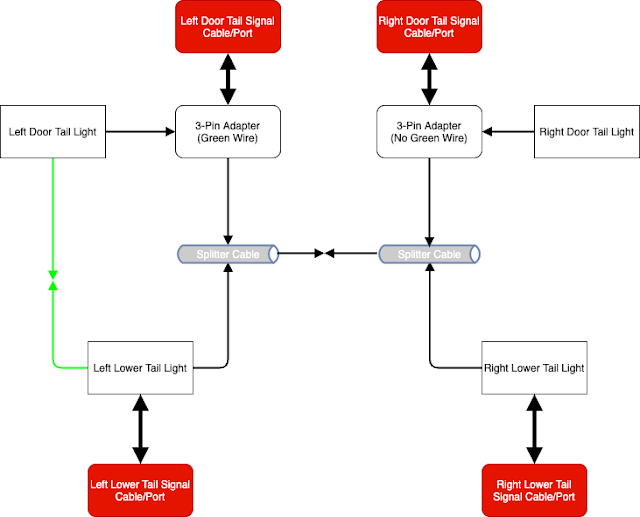
Summary: As a little treat for myself, I bought some real cool aftermarket tail lights from Hansshow as you can see from the video above.  Use coupon code "SARHANSSHOW" for 15% off.  I don't get a cut of any kind, but I like sharing.  Anyway, here is a wiring diagram I drew up to show how everything logically needs to be wired.   If you want to support me and posts like this, you can order Tesla products via my referral link .  Honestly, their referral program these days is kinda lame in my opinion, but hey, you get something and I get something out of it. Notes: For euro spec may be slightly different and 2021 models would use a 4-pin Adapter instead of a 3-pin adapter which is US specific and applies for 2020 models and older.  Basically, if you have a red turn signal, chances are that you have a 3-pin setup. The only downside to these lights in older models is that the turn signal indicators light up in addition to a separate red brake light on the...

NSX-T: Finding Tagless NSX-T VMs with Powershell Core

Image
Summary: Someone asked how you can find NSX-T 'tagless' VM's .  Seemed pretty straight forward and something I could answer w/o the shadow of LucD bot picking and answering while I'm still noodling on it. Anyway here is how it can be done and via Powershell Core (does not work as written in Powershell classic).  No PowerCLI module needed:

Misc: Workaround to silence Outlook for MacOS notification sounds while Do Not Disturb enabled.

Image
Summary: Work from home doesn't mean you should be on 24/7, which is why MacOS's "Do Not Disturb" function is great.  What's not great is that not all apps on MacOS respect it.  Microsoft Outlook for MacOS is one of them.  I've put in a bug/feature request for it to natively respect MacOS do not disturb.  In the meantime, you can make use of MacOS Automator silence your system based on a calendar trigger. It's no fun having anything that isn't muted going off in the middle of the night.  Below can be used to basically mute your system.  You can also have Automator close Outlook, but I've found that muting the system instead will catch any other application offenders that do not respect MacOS's do not disturb function.  Not to mention the dreaded, "Would you like to save this?" message that prevents the app from closing. Workaround: Launch MacOS Automator, you can find it in your Applications Folder. Create your Automator task type by ...

NSX-T: Get BGP Route Table from T0 via Powershell/Curl

Image
Summary: Azure VMware Solution doesn't currently allow CLI/SSH access to your Edge VMs.  So typical CLI way to find information is not possible.  If you need to get things like a route table from your T0, you need to do it through API methods since the UI still doesn't provide this.   [Update: I lied, you can download route table via UI.  But imagine how much cooler you would be using powershell. ;)] UI Method: Powershell Method: Curl Method:

NSX-T: Clear NSX-T DNS Forwarder Cache

Image
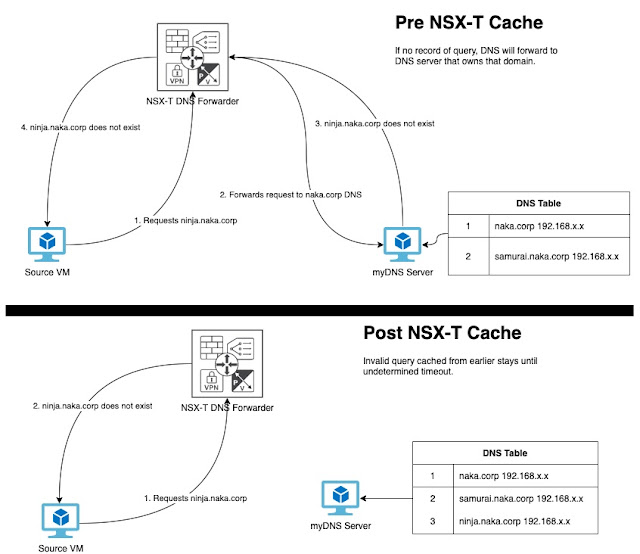
[ Update: NSX-T ingests negative SOA TTL from myDNS server in this example.  Microsoft DNS defaults this to 1 hour.  So NSX-T will cache the negative result for an hour. To combat this behavior, you can set your source DNS server to a lower TTL so that cache in NSX-T clear quicker.  Valid records in this setup will still cache for 1 hour or whatever you have your DNS server set to.] To determine TTL value for the negative record: nslookup -type=a -nosearch -d2 brokenaka.ninja.corp Summary: Ran into an interesting behavior w/ NSX-T's DNS forwarder service.  Basically, if I queried for an invalid DNS name, NSX-T's DNS caching appears to capture that invalid query for an undetermined amount of time. So what does this do?  Basically, if I queried for ninja.naka.corp w/o creating the entry on my DNS server, NSX-T caches that invalid record.  If I then registered ninja.naka.corp on my DNS server, NSX-T will continue to tell me that the record is invalid even thou...

Powershell: Azure submitting JIT Request via Powershell

Image
Summary: If you make use of Azure Security Center w/ your VM's, you can enable Just in Time VM Access (JIT) .  This allows you to open up ports for a finite period of time to access your VM via its public IP.  I make use of this a lot working in my environments to sshuttle in.  Connection will stay active as long as I maintain it, otherwise I get disconnected and have to go through JIT process again. Anyway, going through the portal can get very cumbersome requesting this access, so you can use the below powershell example to automate opening ports, setting time frame, and setting an allowed public IP address source.

PowerCLI: Getting HCL DID, VID, and SVID information.

Image
Summary: Searching for IO devices on VMware's HCL list  is easier, if you have data like DID, VID, and SVID.  Thought I posted on this awhile back, but apparently forgot to do so.  Below is a script that you can run on an ESXi host to get those values needed for the PCI devices you are trying to look up.

Misc: Technology industry new terminology initiative

Image
Summary: I've been working in technology for about 20+ years now, so it'll be difficult for me to break old habits w/ terminology, but I'm posting this here in the hopes that I can continue to adjust to new dynamics. Nothing really technical here, but if you happen to commit/modify code anywhere, here is a good starting point to adjust the terms you use in your code.  Also, a reference point to adjust your spoken vernacular to be inclusive to all those around you. Information shared from the VMware vExpert program . Words Recommended Alternate Other Situational Alternates if Recommended Alternate does not work abort stop ·           cancel ·           halt prematurely ·           end prematurely ·           stop prematurely blacklist ·           denylist (n) · ...

Powershell: Changing NSX-T Segment Profiles enmasse.

Image
Summary: Note to self, cut back on the reddit .  It's a time suck and VMware questions are popping up that I have time to answer w/o the shadow of a retired LucD bot lurking.  Anyway, someone asked if you could update segment profiles, so I got curious and followed the rabbit. Here is the example I came up with.  It's straight powershell core, so no special modules needed, not even vmware.powercli.  GASP!