Posts

Mac: Background flashes, Dock not showing up...
Image
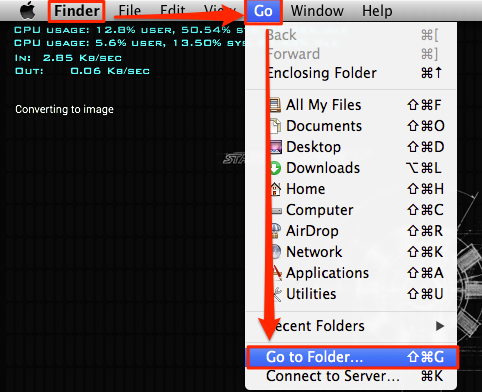
Not sure what caused this as I hadn't done anything unusual w/ my Mac for awhile.  Long story short, some preference in my user profile was causing this issue. In particular, the thought it was my dock preferences, but I had to delete my everything under my user's ~/Library/Preferences to get my account back and working properly.  You should have only to do the following: Delete ~/Library/Application Support/Dock Delete ~/Library/Preferences/com.apple.dock.plist Here is screenshot by screenshot on how to do this:

Interview w/ William Lam on AutoTrader.com Mac Mini vSAN (MacCloud)

Image
Enjoyed my conversation w/ William talking about my ghetto MacCloud setup.  You can read the interview here: http://www.virtuallyghetto.com/2014/08/community-stories-of-vmware-apple-os-x-in-production-part-4.html Some things people have asked me for clarification: We are using Mac Mini 'Server' versions.  These have two drives by default. You can get a kit to add a second drive to the standard mac mini version. Mgmt and VM traffic flows over Standard vSwitch0 (Onboard as Uplink) vSAN and vMotion flows over dVS (Thunderbolt as Uplink) Onboard 1Gb and Thunderbolt 1Gb adapter Booting to USB thumb drive plugged into the back of the Mac Mini w/ ESXi. vCenter is a vCSA built and running on another vCenter instance.  Here is what it looks like configured:

Converged Networking Perils...

Image
Summary: Had a wonderful experience where a P2V VM w/ bonded NIC's brought down several of our ESXi hosts.  HA compounded the problem by powering up the VM on other hosts once the host w/ this VM was brought down.  The perils of converged networking and why it's important to keep your ESXi management/storage separate from your other physical ports.  If these were 'physically' separate, the problem would have isolated to one host and prevented the cascading HA events. Here is the config in short: Dell Blade two nPar'd 10Gb ports --> Internal Dell I/O aggregator ports --> External Dell I/O aggregator ports --> Nexus 5K Management, vMotion, NFS, AND VM traffic go over these two ports. One port goes over Fabric A, the other over Fabric B.  Two physically separate uplinks. What happened: VM w/ bonded NIC's comes online.  This seemed to cause a 'spanning-tree' like event which caused the Internal Dell I/O aggregator ports to go into an...

#freeITBM VMware ITBM Free? (Opinion)

So lately there has been more discussion around the office whether we should move workloads to the 'cloud'?   AWS being the obvious 800lb gorilla .  I recently attended an AWS Essentials training and came out of it really impressed w/ their offering.  So much so, I thought, 'yeah, it might be time to diversify out of my VMware only mindset.' That being said, 'cost' is a huge factor.  Not to mention security and a slew of other things, but we'll focus on cost being the topic.  How in the world do you calculate cost?   VMware  had Chargeback , but that tool was a pain and quite frankly useless.  Now they have ITBM which is a very simplified tool @ it's core, but has some pretty impressive capabilities. Amazon has a calculator , but honestly, I feel like that it is more than likely skewed in favor of AWS .  So this leads me to the idea that VMware needs to take the " Progressive " approach of 'compare' our prices to our competitor...

Amazon Terms translated to VMware (How I understand them anyway)

Feel free to comment.  I'm just taking a simplified view. Amazon EC2 = VM or vSphere Amazon EBS (Elastic Block Store) Volume = vmdk / RDM Amazon S3 = NAS / Windows File Share / NFS Volume / Etc. Amazon AMI = vSphere Template/OVF (Basic OS w/ or w/o applications pre-installed) Amazon RDS = Managed RDS DB (No OS or SQL server to manage) just DB instance. Amazon Cloudwatch = vCenter Operations Manager / HP Insight / SiteScope / Monitoring / Etc. Amazon Elastic Beanstalk = vFabric / Pivotal? Amazon CloudFormation = vApp /  VMware vCloud Automation Center  / VMware Orchestrator (Granular Blueprint)

Useful Powershell .NET method to convert DNS name to IP

Image
Just thought this was useful, so decided to post it as a reminder for myself or anyone else really. [system.net.dns]::gethostaddresses("www.vmware.com") The reverse being: [system.net.dns]::gethostbyaddress("23.64.19.51") Here is how I used it w/ PowerCLI: $VMHosts = Get-VMhost $VMHosts | select Name, @{Name="IP";Expression={[system.net.dns]::gethostaddresses($_.Name)}} This information can be particularly useful if you need IP's for firewall rule tables. Source:  http://blogs.msdn.com/b/powershell/archive/2006/06/26/647318.aspx

VMWorld 2014 - Are you attending?

If not, I highly recommend you register.  Not only is it a fun time, it's probably one of the best 'training' experiences you can get.  In combination w/ the hands-on labs, you'll have access to some of the industries best known experts for immediate answers to your pressing questions.  VMware is also offering 50% off their VCP/VCAP examinations if taken while onsite. Registration Link: http://www.vmworld.com/registration.jspa Letter to convince your Boss: http://download3.vmware.com/vmworld/2014/downloads/vmworld-2014-us-justification-letter.doc VMUG Advantage Discount: By joining the VMUG Advantage program, you can take off $100 of registration among other benefits. For those who are attending: VMUnderground -  http://blog.vmunderground.com/ VMWorld 2014 5k Fun Run -  http://download3.vmware.com/vmworld/2014/downloads/fun-run-info.pdf Recommended Session: INF1601 -  Taking Reporting and Command Line Automation to the Next Level with...
